Migrate Client Sites to GitHub Pages: Beat PaaS Pricing
The Economic Catalyst: Architectural Re-evaluation in the PaaS Ecosystem
The web deployment landscape has experienced a profound paradigm shift over the last several years, driven by the rapidly evolving economic models of Platform-as-a-Service (PaaS) providers. Historically, platforms such as Heroku, Netlify, and Vercel aggressively captured developer mindshare by offering exceptionally generous free tiers, frictionless continuous integration and continuous deployment (CI/CD) pipelines, and unified full-stack developer experiences. These platforms abstracted away the complexities of infrastructure management, allowing agencies to deploy robust Jamstack applications with minimal DevOps overhead. However, as the ecosystem matured and venture-backed providers prioritized profitability, the industry witnessed a systematic deprecation of unmetered free tiers and the introduction of strict, highly monetized usage-based pricing models.
For web development agencies managing portfolios of dozens or hundreds of client sites, these pricing model adjustments present a compounding financial liability. Modern PaaS providers frequently enforce per-seat pricing for organization members, aggressive bandwidth overage charges, and strict limitations on concurrent builds, serverless function execution times, and edge compute invocations. Consequently, an architecture that was initially cost-effective for a growing agency can rapidly transform into an unsustainable financial burden as client traffic scales, or as the agency’s internal development team expands.
This acute economic pressure has catalyzed a broader architectural re-evaluation within the web development community, leading to the resurgence of highly decoupled, composable architectures. By permanently separating static frontend hosting from dynamic backend compute and third-party API consumption, agencies can radically optimize infrastructure costs without sacrificing performance or scalability. GitHub Pages has emerged as a premier target for this architectural migration. As a static hosting solution inherently bundled with GitHub repository management, it offers unparalleled cost efficiency, global content delivery network (CDN) distribution, and native integration with GitHub Actions for automated, highly customizable deployment workflows.
However, transitioning a production-grade application from a fully managed, opinionated PaaS to GitHub Pages is not merely a change in hosting providers; it requires a fundamental restructuring of the application architecture itself. GitHub Pages serves strictly static assets, meaning that server-side rendering (SSR), incremental static regeneration (ISR), proprietary edge middleware, and built-in serverless functions native to platforms like Vercel or Netlify are not natively supported. Executing this migration requires the adoption of alternative edge compute providers, custom continuous deployment configurations, advanced client-side routing strategies, and externalized identity management to maintain the functional parity of modern Single Page Applications (SPAs).

Assessing the Hosting Landscape and Capacity Constraints
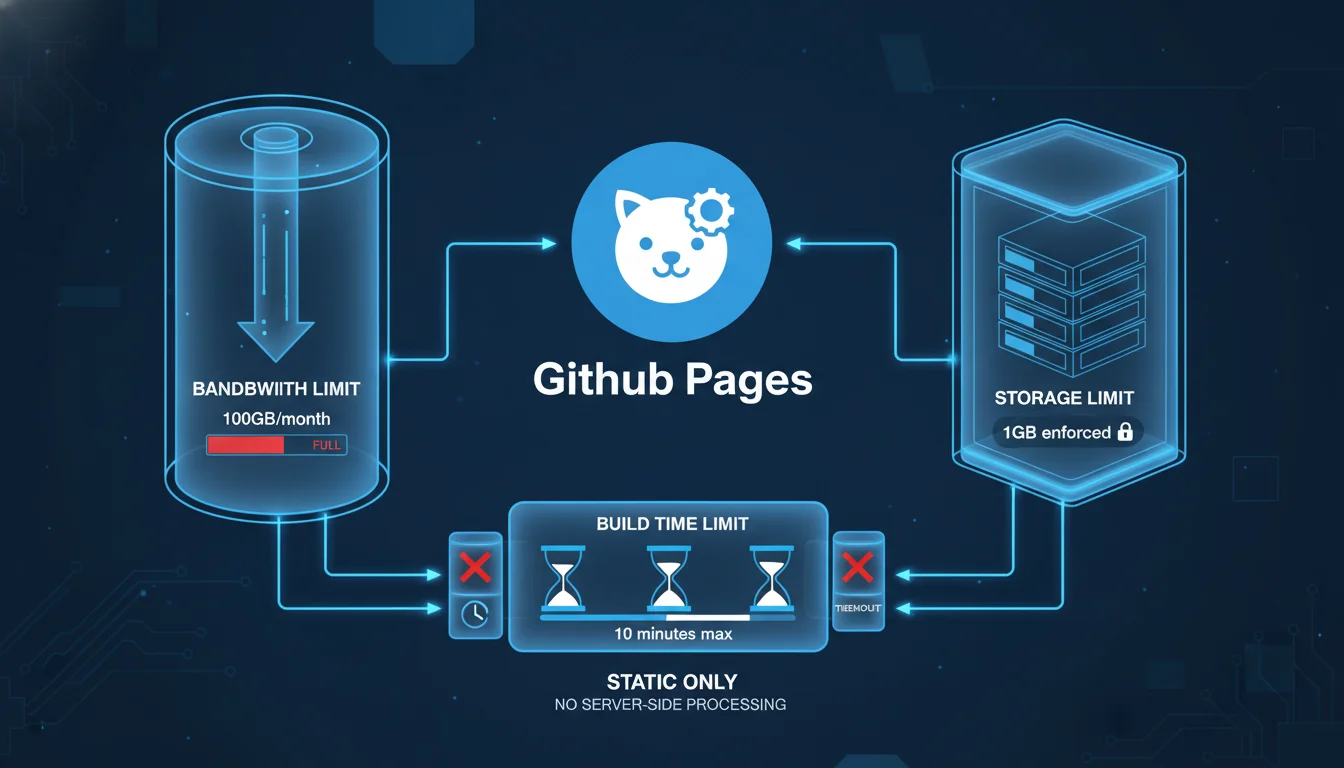
Before initiating a migration, architects must conduct a rigorous capacity planning assessment to ensure that the target environment can sustain the client’s traffic patterns, storage requirements, and build frequencies. While GitHub Pages is highly resilient, it enforces specific soft and hard limits designed to prevent infrastructural abuse and ensure equitable resource distribution across its global CDN network.
The most prominent constraint is the bandwidth limitation. GitHub Pages imposes a soft limit of 100 gigabytes (GB) of bandwidth per month per repository. To contextualize this limit mathematically, a heavily optimized static website with an average page payload of 1 megabyte (MB) can sustain approximately 100,000 page views per month before triggering this threshold. While this is categorized as a soft limit—meaning GitHub does not immediately terminate service upon breach—consistent, excessive overages may prompt communications from GitHub Support requesting the implementation of a third-party CDN, such as Cloudflare, to offload the traffic layer.
In addition to bandwidth, temporal and frequency limits apply to the deployment pipelines. GitHub Pages restricts automated builds to 10 executions per hour, and any individual deployment process that exceeds 10 minutes will automatically time out and fail. For complex applications utilizing resource-intensive static site generators (SSGs) or massive image optimization routines, this 10-minute threshold demands strict pipeline optimization, aggressive caching, or the externalization of build processes.
Storage constraints further dictate the structural boundaries of the migrated repository. The total size of a published GitHub Pages site cannot exceed 1 GB, and the source repository itself is strongly recommended to remain under 1 GB, with a hard maximum threshold of 5 GB for enterprise environments before automated warnings are triggered. Furthermore, Git operations enforce a hard block on any individual file exceeding 100 megabytes (MB), and issue warnings for files surpassing 50 MB. Applications relying on large embedded media assets must externalize these files using Git Large File Storage (LFS) or migrate them to dedicated object storage solutions like Amazon S3, Cloudflare R2, or specialized media CDNs prior to deployment.
A comprehensive comparison of the prevailing hosting alternatives further contextualizes the strategic value of GitHub Pages against its competitors, guiding architects in determining if a pure static migration is viable or if an alternative platform is required for specific workloads.
| Hosting Platform | Primary Architecture Focus | Free Tier Allowances | Key Technical Constraints and Strengths |
|---|---|---|---|
| GitHub Pages | Pure static asset hosting directly from Git repositories. | 100 GB bandwidth, unlimited sites, 1 GB site size. | No native serverless backend; requires public repos on free tiers. |
| Cloudflare Pages | Edge-hosted static sites with integrated Worker functions. | Unmetered bandwidth, 500 build minutes. | Exceptional CDN performance; backend strictly limited to V8 isolates. |
| Netlify | Jamstack orchestration, forms, and background functions. | 100 GB bandwidth, 300 build minutes. | Excellent DX but strict overage billing and per-seat organizational pricing. |
| Vercel | Frontend meta-framework optimization (Next.js). | 100 GB bandwidth, 100 daily deployments. | Superior SSR/ISR support; commercial use prohibited on Hobby tier. |
| Render | Heroku-style managed PaaS for full-stack applications. | Limited free instances spun down on idle. | Native support for persistent databases, Docker containers, and background workers. |
| DigitalOcean App Platform | Managed infrastructure for moderate complexity apps. | 3 static sites. | Highly predictable scaling costs; less opinionated than Vercel but requires more manual orchestration. |
A critical third-order consequence of migrating to GitHub Pages involves repository visibility and its impact on proprietary code security. On the standard GitHub Free tier, publishing a GitHub Pages site requires the underlying repository to be completely public. For commercial client sites containing proprietary business logic, hardcoded configurations, or sensitive architectural patterns in the frontend source code, this is an unacceptable security posture. Agencies must either upgrade their overarching organization to GitHub Pro or GitHub Team (which permits private repositories for user-centric pages), or utilize GitHub Enterprise Cloud, which exclusively enables the private publication of GitHub Pages sites governed by strict access control policies.
Agency Governance: Multi-Tenant Architecture and Access Management
Managing a multitude of client projects requires an highly structured approach to repository naming conventions, identity management, and access provisioning. Without strict, documented governance, an agency’s GitHub infrastructure can rapidly devolve into an unmanageable matrix of fragmented codebases, posing significant security, compliance, and operational risks.
Structural Paradigms for Client Portfolios
Agencies generally adopt one of two structural paradigms when managing client portfolios on GitHub. The first paradigm involves creating a single, centralized agency organization encompassing all client repositories. In this monolithic governance model, repositories must utilize highly disciplined naming conventions to maintain operational clarity and prevent overlapping namespaces. The industry-recommended approach is to prefix repositories with the client identifier, followed by the project name, and concluding with the primary technology stack or microservice designation (e.g., clientalpha_ecommerce_frontend_react or clientbravo_marketing_site_nuxt). This approach centralizes billing and organizational policies, allowing agency owners a single pane of glass, but requires meticulous Role-Based Access Control (RBAC) to ensure clients or specific contractors only have visibility into their respective assets.
The second paradigm involves provisioning discrete GitHub Organizations for each individual client. This decentralized model fundamentally simplifies access management, as external stakeholders can be granted broad permissions within their isolated organization without risking cross-client data exposure or navigating complex repository policies. Furthermore, this model creates a seamless, frictionless pathway for future client handoff.
If a client terminates their contract, is acquired, or brings development in-house, the entire organization—inclusive of repositories, project boards, issue trackers, and deployment histories—can be seamlessly transferred to the client’s control without dissecting a centralized agency infrastructure. To execute this handoff, the agency simply invites the client’s technical administrator to the organization, elevates their permissions to the “Owner” role, and subsequently removes the agency’s internal developers and billing associations.
Implementing Role-Based Access Control (RBAC)
Regardless of the chosen structural paradigm, agencies must rigorously enforce the principle of least privilege across all integrated systems. GitHub provides a hierarchical permission structure encompassing organization-level roles, team-level roles, and repository-level roles.
Organization owners wield absolute administrative control, including the ability to manage billing, modify global repository policies, integrate GitHub Apps, and permanently archive or delete repositories. To protect against single points of failure—where an agency might lose access to its entire infrastructure if a single owner becomes unreachable—it is a critical architectural best practice to designate at least two organization owners. Developers within the agency should be assigned the standard “Member” role and organized into logical teams based on client accounts or technological disciplines.
When integrating external client personnel, third-party auditors, or freelance contractors into the workflow, they should be strictly classified as “Outside Collaborators.” This specific designation grants granular, repository-specific access (Read, Triage, Write, Maintain, or Admin) without exposing broader organizational metrics, internal discussions, team structures, or exposing the existence of other clients.
Role Classification
-
Organization Owner
Complete administrative control over billing, security policies, app integrations, and all repositories.
Strictly restricted to agency principals and lead infrastructure architects.
-
Organization Member
Baseline access to organization resources, bound by specific team assignments and repository policies.
Assigned to internal agency developers, designers, and project managers.
-
Outside Collaborator
Granular access restricted to explicitly assigned repositories; no access to organizational settings or metrics.
Assigned to client stakeholders, external auditors, or temporary freelance contractors.
-
Security Manager
Global read access to code and write access to security alerts, vulnerability reporting, and code scanning settings.
Assigned to dedicated DevSecOps personnel managing organizational compliance.
For agencies utilizing GitHub Enterprise Cloud, the management of GitHub Pages can be further restricted at the organizational level through robust repository policies. Owners can configure policies to allow or completely disallow the publication of sites, or restrict publications exclusively to private access, thereby preventing the accidental public exposure of internal staging environments, unreleased features, or sensitive client data.
Pre-Migration Auditing and Codebase Preparation
Executing a migration requires a meticulously planned pre-migration audit to identify all PaaS-specific dependencies deeply embedded within the legacy codebase. Because platforms like Heroku, Netlify, and Vercel offer proprietary features that cannot be seamlessly transferred, these features must be identified, decoupled, and replaced prior to altering deployment targets.
A comprehensive audit begins with establishing an inventory of all repositories slated for migration. Architects must document existing repository data sizes, commit histories, Git LFS usage, and all external tool integrations. To rapidly assess large portfolios, agencies can leverage advanced search protocols, such as using the Model Context Protocol (MCP) in conjunction with tools like Grep, to query thousands of repositories simultaneously for specific strings or configurations indicative of PaaS lock-in.
Specifically, auditors should search for proprietary configuration files such as netlify.toml, vercel.json, or Procfile (in the case of Heroku). The presence of directories named /functions/, /api/, or /_middleware indicates the use of serverless or edge compute resources that must be completely re-architected. Furthermore, Heroku deployments often rely on an ephemeral filesystem, meaning applications that write data locally must be refactored to interface with managed databases (e.g., PostgreSQL) or object storage (e.g., Amazon S3) before migrating to a stateless static architecture.
Security auditing is arguably the most critical phase of pre-migration preparation. When migrating to GitHub Pages—particularly if transitioning from a private PaaS environment to a public GitHub repository to utilize the free tier—all secrets, API keys, and sensitive environment variables must be rigorously rotated and scrubbed from the commit history. Storing secrets in a static site exposes them entirely to the client’s browser, allowing malicious actors to scrape the keys and compromise associated backend services. Agencies must deploy secret scanning tools like TruffleHog or Gitleaks to ensure no legacy credentials exist within the repository history before executing the final migration.
To validate the migration strategy without risking production environments, agencies should perform comprehensive dry-run migrations. Using tools like the GitHub Enterprise Importer (GEI) allows organizations to migrate repository content alongside associated metadata (such as Pull Requests and Issues) into a staging enterprise account to verify structural integrity and test GitHub Actions compatibility before the actual cutover.
Adapting Frontend Frameworks for Static Export
Modern JavaScript frameworks, including Next.js, Nuxt, and SvelteKit, operate primarily through dynamic server-side rendering (SSR) or complex hybrid architectures that rely on Node.js runtimes. Migrating these frameworks to GitHub Pages requires strictly conforming to Static Site Generation (SSG) protocols, effectively compiling the application down to pure HTML, CSS, and JavaScript artifacts that can be distributed across a CDN. Each framework possesses specific configuration parameters that must be modified to ensure output compatibility with GitHub’s static servers.
Next.js Static Export Configuration
Next.js, natively maintained by Vercel, defaults to a server-dependent execution model.
To successfully deploy a Next.js application to GitHub Pages, the framework must be explicitly instructed to compile a static output via its Static Export feature. This is achieved by modifying the next.config.js file and setting the output parameter to ‘export’. Because GitHub Pages operates under a strict URL structure—often serving project sites from a repository subpath rather than a root domain—Next.js must be configured to append this specific subpath to all internal asset requests. Developers must accurately define the basePath and assetPrefix configuration keys to match the repository name precisely. Without this specific configuration, the compiled application will attempt to load critical JavaScript chunks, CSS files, and images from the root domain, resulting in catastrophic 404 errors and a completely broken user interface. For deep debugging during the migration, developers can temporarily set swcMinify: false within the configuration to prevent the removal of console.log() statements in the production build, though this must be re-enabled prior to final deployment.
Migrating away from Vercel inherently means abandoning proprietary performance features, most notably the Next.js Image Optimization API. This API relies heavily on Vercel’s proprietary edge network for real-time image resizing, cropping, and WebP/AVIF format conversion. Agencies must implement custom image loaders within Next.js and integrate external media optimization networks to handle responsive media generation dynamically. Industry-standard alternatives include Cloudinary, which offers expansive transformations but features a complex, usage-based credit model; Imgix, known for cleaner billing structures; or Cloudflare Images, which integrates seamlessly if the domain is already proxied through Cloudflare’s network.
Nuxt 3 Static Generation
Similarly, Nuxt 3 (the Vue.js meta-framework) natively supports Node.js server deployment via its Nitro engine but offers a dedicated, highly optimized preset specifically for GitHub Pages migrations. To deploy a Nuxt application statically, developers must execute the build command specifying this exact preset: npx nuxt build –preset github_pages.
Like Next.js, Nuxt requires an explicit awareness of its hosting subpath to resolve static assets correctly across its virtual DOM. If the client site does not utilize a custom apex domain, the NUXT_APP_BASE_URL environment variable must be explicitly defined during the CI/CD build step, corresponding directly to the repository slug (e.g., NUXT_APP_BASE_URL=/
For Nuxt applications requiring dynamic routes mapped to external headless CMS data (e.g., generating individual blog posts based on API responses), the nuxt.config.js file must be expanded to programmatically fetch and define all necessary routes prior to the build execution. Without this configuration, the SSG engine cannot anticipate the dynamic paths, and the resulting static export will lack the necessary HTML files, leading to immediate 404 errors upon direct navigation.
Vite and React Single Page Applications
For standalone React, Vue, Svelte, or Vanilla JavaScript projects bundled via Vite, the configuration is more direct but requires identical attention to the base deployment path. Within the vite.config.js file, the base property must be assigned to the repository name (e.g., base: ‘/repo-name/’) to ensure that internal imports for module scripts and CSS link tags are prefixed correctly upon compilation. The standard build script (vite build) generates the heavily optimized static assets into the dist folder, which serves as the designated upload artifact for the GitHub Actions deployment pipeline.
| Frontend Framework | Static Output Configuration Directive | Asset Path Modification Requirement | Final Build Artifact Directory |
|---|---|---|---|
| Next.js | output: ‘export’ declared in next.config.js. | Set basePath and assetPrefix to repo name. | out. |
| Nuxt 3 | Build CLI flag: –preset github_pages. | Define NUXT_APP_BASE_URL environment variable. | .output/public. |
| Vite (React/Vue) | Execute standard vite build command. | Define base: ‘/repo-name/’ in vite.config.js. | dist. |
Overcoming Single Page Application (SPA) Routing Limitations
The most technically complex hurdle when migrating client sites from advanced PaaS providers to GitHub Pages is the handling of client-side routing architectures. Modern Single Page Applications built with React Router, Vue Router, or Angular Router utilize the HTML5 History API to manipulate the browser’s URL dynamically without requesting a new page payload from the server.
On PaaS providers like Netlify or Vercel, developers seamlessly configure URL rewriting. For instance, placing a _redirects file containing /* /index.html 200 instructs the Netlify server to return the root index.html file for any path that does not physically exist on the server (e.g., /about-us), allowing the client-side JavaScript router to take over and render the correct component view.
GitHub Pages, however, utilizes a rigid static file server architecture that strictly maps URL paths directly to the underlying filesystem. It does not support native URL rewriting, dynamic wildcard redirect rules, or .htaccess modifications. When a user manually refreshes a deeply nested route on a GitHub Pages SPA, or accesses it via a direct external link, the GitHub server searches for a corresponding physical directory and HTML file (e.g., an /about-us/index.html file). Failing to locate this physical asset, the server immediately returns a standard 404 error page, completely breaking the application and stranding the user.
One potential mitigation strategy is converting the application’s routing module from a BrowserRouter to a HashRouter. This appends a hash symbol to all URLs (e.g., ), which prevents the browser from making a new network request to the server, keeping all navigation entirely client-side. However, this introduces aesthetically distasteful URLs and disrupts standard analytics tracking, making it an unacceptable compromise for high-end agency clients.
To circumvent this severe limitation while maintaining clean URLs, agencies must deploy a highly specific script injection mechanism, widely popularized in the open-source community as the rafgraph/spa-github-pages hack. This intricate workaround leverages the sole routing customization that GitHub Pages allows: the designation of a custom 404.html error page.
The architecture of this workaround operates in a two-stage interception process. First, a custom 404.html file is explicitly placed in the root of the public build directory. Within this file, a JavaScript block intercepts the incoming request immediately upon a server failure. It parses the current URL, extracts the requested path and query parameters, and converts them into a complex query string appended to the root domain. The script then forces an immediate window.location.replace redirect back to the root index.html. Crucially, the custom 404.html file must contain over 512 bytes of data; otherwise, older legacy browsers (specifically Internet Explorer) will ignore the file entirely and display their own internal default error page, breaking the script injection. Furthermore, if the site is hosted on a Project Page (with a subpath) rather than an apex domain, the pathSegmentsToKeep variable within the script must be explicitly set to 1 to prevent the script from stripping the repository name out of the redirected URL.
The second stage of the interception occurs within the index.html file itself. Before the React or Vue application initializes, an inline JavaScript snippet reads the custom query string (/?/about), strips the proprietary query formatting, and utilizes the window.history.replaceState method to silently restore the URL in the browser’s address bar to its original intended state (/about). By the time the JavaScript framework boots and queries the current URL to determine which component to mount, the URL has been perfectly restored, and the application renders the requested view flawlessly.
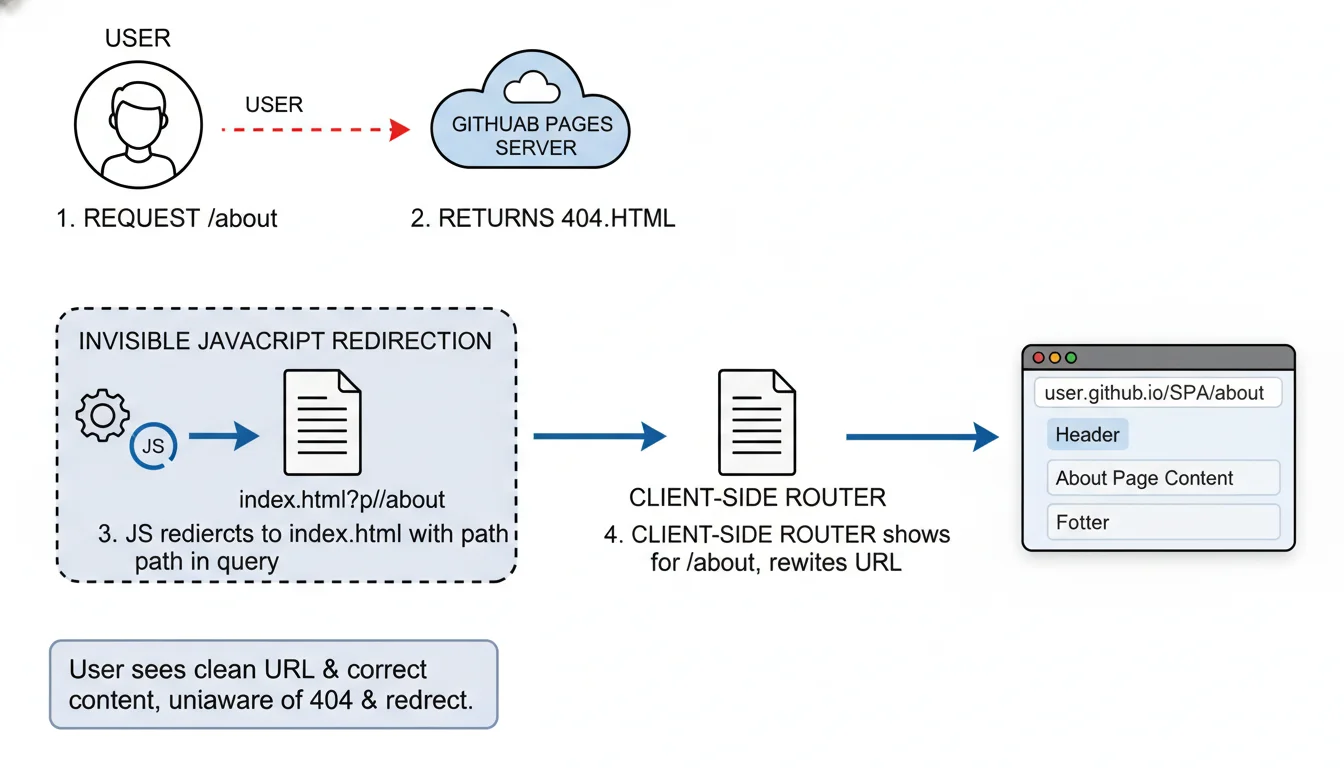
While highly effective from a user experience standpoint, this mechanism possesses a critical flaw: it generates a fleeting HTTP 404 status code before the redirect occurs. This carries profound secondary implications for Search Engine Optimization (SEO). Search engine crawlers encountering the initial 404 response will assume the page is dead and may refuse to index the specific sub-page entirely. Consequently, for content-heavy client sites heavily reliant on organic search visibility, relying on an SPA architecture with this 404 hack is detrimental.
Rendering the site as a fully static HTML export (SSG) via Next.js or Nuxt—where physical HTML files genuinely exist for every route—is the only architecturally sound alternative for SEO-dependent applications.
Decoupling the Backend: Edge Compute and Serverless Alternatives
Platforms like Vercel and Netlify offer deep, symbiotic integration of serverless computing, edge middleware, and background processing directly alongside frontend codebases. When migrating to GitHub Pages—a platform that exclusively serves static files—all dynamic backend functionality, data mutations, and specialized routing logic must be strategically decoupled and relocated to independent execution environments.
Replacing Serverless and Edge Functions
Netlify Functions and Vercel Edge Middleware execute localized backend logic, such as geographic routing, dynamic header injection, A/B testing variations, and proprietary API wrapping. To replicate this functionality seamlessly, developers must migrate this compute logic to specialized, globally distributed edge networks, with Cloudflare Workers and Supabase Edge Functions acting as the premier architectural alternatives.
Cloudflare Workers operate on a globally distributed V8 isolate runtime, bypassing the heavy infrastructure of traditional Node.js containers to provide exceptional cold-start speeds (often under 5 milliseconds) and massive geographical distribution across hundreds of data centers. Migrating legacy Netlify functions to Cloudflare Workers requires refactoring the standard Node.js handler syntax into the Fetch API standard natively utilized by Cloudflare. This decoupling offers a profound second-order benefit: by placing the compute layer entirely at the DNS resolution level, agencies can intercept, mutate, and cache requests long before they ever reach the GitHub Pages origin servers. This allows for the dynamic injection of security headers (which GitHub Pages strips natively) or the implementation of sophisticated rate limiting protocols without exposing the underlying static host.
Alternatively, for complex applications heavily reliant on PostgreSQL databases, Supabase Edge Functions offer a highly compelling TypeScript-native environment built upon the Deno runtime. These functions run globally and integrate seamlessly with Supabase’s Row Level Security (RLS) policies, making them ideal for executing secure database mutations, processing external webhooks, and interacting with third-party payment gateways like Stripe. However, integrating Deno-based functions into legacy Node.js environments can present localized dependency conflicts and requires strict adherence to the Supabase CLI (supabase functions serve) for local testing parity.
Replacing Background Jobs and Scheduled Tasks
A secondary dependency holding agencies to PaaS providers is the reliance on automated background execution, such as Netlify Scheduled Functions or Vercel Cron. These services execute periodic tasks, such as database cleanup, automated email dispatch, or API synchronization, without requiring a perpetually running server.
Because GitHub Pages cannot run server-side code, developers must adopt external cron triggers. GitHub Actions itself serves as a highly capable, free-tier alternative by utilizing the schedule event trigger (configured via standard CRON syntax) to execute periodic API calls or database manipulation scripts directly from the repository’s workflow runners. While GitHub Actions is robust, it lacks sub-minute granularity and can experience queuing delays during peak network hours. Alternatively, specialized serverless message queues like Upstash QStash, Cloudflare Workers Cron Triggers, or external scheduling services like cron-job.org can be utilized to decouple background workloads from the frontend deployment lifecycle entirely, offering highly reliable, granular webhook invocation.
Securing Static Architectures: API Proxies and Secrets Management
A fundamental, unalterable vulnerability of pure static site hosting is the absolute inability to securely store secret API keys or database credentials. In traditional monolithic environments or integrated PaaS platforms, sensitive credentials (e.g., database connection strings, Stripe secret keys, or OpenAI tokens) are injected securely into the server runtime via environment variables, completely insulated from the end user. However, on a static platform like GitHub Pages, any data utilized by the frontend is compiled directly into the HTML, CSS, or JavaScript bundles, making it entirely visible in plain text to anyone inspecting the browser’s network traffic or source code.
To maintain security parity and prevent catastrophic credential leakage during the migration, agencies must implement a specialized middleman proxy architecture. Cloudflare Workers excel exponentially in this capacity, acting as an impenetrable cryptographic barrier between the public static site and the secure third-party API.
Instead of the static GitHub Pages frontend making a direct fetch request to a third-party API (thereby exposing the secret key in the request headers), the frontend sends an unauthenticated request directly to the Cloudflare Worker URL.
The Cloudflare Worker is configured with securely encrypted environment variables managed entirely off-site via the Cloudflare dashboard or the command line utility wrangler secret put
Re-architecting Forms and User Authentication
Another critical layer of PaaS lock-in involves integrated, zero-configuration form handling (e.g., Netlify Forms) and bundled identity management. GitHub Pages consists of static HTTP servers; it cannot natively accept, parse, or route POST requests generated by HTML forms. Consequently, all form submissions must be explicitly routed to specialized third-party endpoints.
Solutions like Basin, StaticForms, Getform, and Formspree provide dedicated API endpoints capable of receiving form payloads, executing advanced spam filtering, and routing notifications to agency communication channels or CRM databases. Evaluating these providers reveals distinct operational differences vital for agency scale.
| Form Provider | Key Differentiators and Integrations | Agency Pricing Dynamics |
|---|---|---|
| Basin | Custom email templates, custom domains, advanced spam filtering (Custom Honeypot). | Highly scalable pricing, offering unlimited data retention and 25,000 monthly submissions on premium tiers. |
| StaticForms | Advanced CAPTCHA options (reCAPTCHA v3, Cloudflare Turnstile, Altcha), auto-responders. | Generous free tier with higher submission limits compared to legacy providers. |
| Getform | Simple integration, file upload support, webhook integrations. | Strictly tiered pricing that becomes cost-prohibitive for high-volume agency portfolios (up to $99/mo). |
| Formspree | Deeply established ecosystem, robust third-party integrations. | Poses limitations on free tier regarding spam protection and branding control. |
For applications requiring user accounts, authentication must transition from PaaS-managed identity (e.g., Netlify Identity) to specialized decoupled identity providers. Integrating Supabase Auth allows static GitHub Pages sites to support complex OAuth flows (such as GitHub, Google, or Apple logins) alongside passwordless magic links.
The integration process requires initializing a Supabase project and executing an SQL schema via the Supabase Dashboard or CLI (supabase db pull) to establish the users table. Subsequently, developers must register a new OAuth application natively within GitHub’s developer settings, capturing the generated Client ID and Client Secret. These credentials are input into the Supabase authentication dashboard, and crucially, the Authorization Callback URL must be strictly configured to point back to the Supabase project instance (e.g., ) to prevent redirect mismatch errors. The static frontend then utilizes the Supabase JavaScript client library to manage the session state securely using JSON Web Tokens (JWTs), entirely independent of the GitHub Pages hosting infrastructure.
Continuous Integration and Deployment (CI/CD) with GitHub Actions
With the frontend framework configured and backend dependencies decoupled, the deployment pipeline must be meticulously automated. PaaS providers typically feature seamless “Git Push to Deploy” architectures natively, requiring zero configuration from the developer. To achieve this level of continuous deployment velocity natively on GitHub, developers must author custom YAML workflows leveraging the power of GitHub Actions.
The transition to GitHub Actions provides agencies with vastly superior granularity, audibility, and control over the deployment lifecycle, allowing for multi-stage testing, artifact generation, and customized dependency caching strategies before publication. To authorize GitHub Actions to deploy to GitHub Pages, the repository settings must be modified.
Under the repository’s “Pages” configuration, the “Source” dropdown must be explicitly changed from “Deploy from a branch” to “GitHub Actions”.
A robust deployment workflow, generally stored at .github/workflows/deploy.yml, is architecturally divided into two interdependent jobs: the build job and the deploy job.
The pipeline is configured to trigger automatically on push events targeted at the main production branch (on: push: branches: [‘main’]), or manually via workflow_dispatch. In the build phase, the runner provisions a virtual environment (typically ubuntu-latest), checks out the source code (actions/checkout@v4), and sets up the necessary Node.js version using the actions/setup-node@v4 action, aggressively configuring npm caching to accelerate subsequent build times. After installing dependencies and executing the build script, the crucial transition occurs via the actions/upload-pages-artifact@v3 action. This highly specialized action compresses the framework’s output directory (e.g., ./dist for Vite, or ./.output/public for Nuxt) into a secure, symlink-free tar archive and uploads it directly to GitHub’s internal artifact storage system.
The subsequent deploy job relies heavily on GitHub’s OpenID Connect (OIDC) capabilities to authenticate the deployment securely without requiring hardcoded personal access tokens. It requires explicit permissions granted within the YAML file (permissions: pages: write, id-token: write) to allow the built-in GITHUB_TOKEN to modify the protected Pages environment. Upon retrieving the previously uploaded artifact, the workflow utilizes the actions/deploy-pages@v4 action to distribute the static files across the GitHub Pages global CDN. This completely automated workflow achieves total functional parity with native PaaS deployments, centralizing infrastructure orchestration directly within the codebase.
If an agency possesses exceptionally complex multi-cloud requirements that exceed the capabilities of GitHub Actions, they may integrate alternative CI/CD platforms like Spacelift (for Infrastructure-as-Code policy enforcement), CircleCI (for massive parallelization and Docker/Kubernetes routing), or Jenkins, though these introduce significant maintenance overhead compared to the native GitHub integration.
The Zero-Downtime DNS Migration Protocol
The final, most sensitive, and highest-risk phase of migrating a client site is the transition of Domain Name System (DNS) records. Migrating DNS requires extreme precision and systemic understanding; improper execution can result in extended site outages, broken SSL certificates, catastrophic SEO ranking drops, and severe degradation of client trust. The objective is a flawless zero-downtime migration, ensuring users are seamlessly routed from the legacy PaaS host to the new GitHub Pages infrastructure without a single dropped packet or security warning.
Preparing the Target Environment
Prior to altering any external DNS records, the GitHub Pages repository must be properly configured to accept the incoming custom domain traffic. Within the repository settings under “Custom domain,” the client’s apex domain (e.g., example.com) or subdomain (e.g., www.example.com) must be entered and saved. This action prompts GitHub to automatically generate a CNAME file in the root of the repository. If the agency is utilizing custom GitHub Actions, the developer must ensure that a CNAME file containing the domain string is programmatically injected into the public output folder during the build process to prevent the domain binding from breaking on subsequent deployments.
Simultaneously, it is an absolute security imperative to initiate the domain verification process. By generating a TXT record with the DNS provider to verify ownership cryptographically, agencies prevent critical domain takeover vulnerabilities, where malicious actors could potentially claim the client’s unverified domain on their own GitHub account.
Executing the TTL Reduction Strategy
DNS records are heavily cached by Internet Service Providers (ISPs), local routers, and browsers globally, dictated by the Time to Live (TTL) value. If a DNS record has a standard TTL of 24 hours, any changes made to point the domain away from Netlify or Vercel toward GitHub Pages will take up to a full day to propagate globally, resulting in unpredictable traffic splitting where some users see the old site and some see the new site.
To orchestrate a true zero-downtime cutover, the agency must access the client’s current DNS management panel (often Cloudflare, Google Domains, or Route53) at least 24 to 48 hours before the planned migration. The TTL value on the existing records pointing to the legacy PaaS must be artificially lowered to the minimum allowable threshold (typically 300 seconds, or 5 minutes).
Modifying the DNS Records
Once the low TTL has propagated globally across the internet’s backbone, the actual record modifications can commence. The exact record types depend on whether the site utilizes a subdomain or an apex domain, and whether the DNS provider supports advanced routing capabilities.
For subdomains (e.g., www.example.com), the existing CNAME record must be modified to point directly to the GitHub Pages default URL structure:
For apex domains (e.g., example.com), DNS protocols traditionally forbid CNAME records at the root level. Agencies utilizing modern DNS providers like Cloudflare can leverage ALIAS or ANAME records (a process often referred to as CNAME flattening) to point the root directly to
| Domain Type | Target Record Type | Recommended Configuration Value |
|---|---|---|
| Subdomain (www) | CNAME | |
| Apex Domain (Root) | ALIAS / ANAME (If supported) | |
| Apex Domain (Root) | A Records (Fallback) | Manually map to GitHub’s 4 designated IP addresses |
SSL Provisioning and Cache Invalidation
Following the DNS modification, traffic will begin flowing to the GitHub Pages servers within minutes due to the lowered TTL. However, modern browsers strictly enforce HTTPS, and the legacy SSL certificate managed by the previous PaaS will no longer be valid for the new endpoint.
GitHub Pages automatically provisions Let’s Encrypt SSL certificates for custom domains to ensure continuous encryption. However, this automated provisioning is triggered only after the DNS propagation successfully reaches GitHub’s servers. To force HTTPS encryption, the “Enforce HTTPS” setting in the repository must be toggled. It may be temporarily disabled or unavailable while the certificate generation resolves in the background, a process which can take up to 24 hours in rare circumstances, though usually resolves much quicker. Once the certificate is secured and traffic flows seamlessly, the agency must restore the DNS TTL back to standard operational levels (e.g., 1 hour or 24 hours) to restore network caching efficiency, reduce DNS query loads, and finalize the migration.
Post-Migration Auditing and Client Handoff Best Practices
The completion of DNS propagation marks the transition from active deployment to the operational monitoring phase, necessitating a comprehensive post-migration audit. Because GitHub Pages fundamentally alters the deployment artifact architecture and the underlying server environment, the agency must meticulously validate that the client’s asset delivery and backend integrations remain uninterrupted.
Auditing protocols must rigorously verify that all external integrations are functioning correctly in the production environment. This includes ensuring that Webhooks triggering Cloudflare Workers are firing, form submissions are successfully routing to Basin endpoints without triggering CORS errors, and edge authentication handshakes with Supabase are maintaining active session states across page reloads.
The configuration of HTTP headers must also be evaluated extensively. Unlike Vercel or Netlify, which allow extensive header manipulation via _headers or vercel.json files to define Cross-Origin Resource Sharing (CORS) or strict iframe policies, GitHub Pages natively strips custom HTTP headers out of the response. Consequently, external assets and APIs must be verified to ensure strict CORS compliance does not block legitimate cross-domain requests on the new host. If custom headers are absolutely mandatory for compliance or security protocols, the agency cannot rely on GitHub Pages alone; they must proxy the entire GitHub Pages domain through a Cloudflare network boundary, allowing Cloudflare Page Rules or Workers to forcefully inject the required headers before the payload reaches the end user.
Finally, managing the client handoff process requires strategic foresight, especially when transferring technical ownership of the infrastructure.
If the agency has utilized a decentralized organization model (one GitHub Organization per client), the handoff process is highly streamlined and frictionless. The agency simply invites the client’s technical administrator to the organization, elevates their permissions to “Owner,” and removes the agency’s internal developers. This permanently transfers ownership of the repository, the GitHub Actions execution minutes, and any billing associations directly to the client, effectively removing the agency as a permanent technical bottleneck or financial intermediary.
For clients lacking deep technical expertise, handing over a Git-based repository can be intimidating. Establishing comprehensive documentation detailing the new Git-based content management workflows—or seamlessly integrating a Git-native headless Content Management System (CMS) that commits directly to the repository via API—ensures the client can maintain content updates autonomously without directly interacting with the command line, understanding markdown, or triggering CI/CD pipelines manually.