GA4 E-commerce Tracking Guide: Implementation & Optimization
The transition from Universal Analytics (UA) to Google Analytics 4 (GA4) represents a fundamental paradigm shift in digital measurement and e-commerce analytics. For over a decade, digital marketers and data architects relied on UA’s session-based data model, which was heavily dependent on pageviews and discrete “Enhanced Ecommerce” toggles that were manually configured within administrative panels. GA4 entirely abandons this legacy framework in favor of a flexible, event-driven architecture. In this modern schema, every user interaction—from viewing a product category to completing a transaction—is processed as an independent event containing granular, contextual parameters.
For e-commerce operators, this architectural shift demands a significantly more rigorous approach to data collection, taxonomy design, and platform integration. Implementation requires adding the Google tag (gtag.js) or utilizing Google Tag Manager (GTM) to interface with the website’s source code, as GA4 does not automatically track advanced e-commerce behaviors without explicit, manual configuration. The reliance on a highly structured event taxonomy means that failure to configure data layers accurately will result in immediate data corruption or total tracking failure. However, when properly instrumented, GA4 provides an exhaustive, cross-device view of the customer journey, typically populating monetization reports within 24 to 48 hours of initial tag deployment.
This report provides a comprehensive examination of GA4 e-commerce tracking in the 2026 landscape. It details the underlying data schemas, platform-specific deployment mechanisms across enterprise content management systems, the critical migration to server-side data governance, privacy compliance frameworks necessitated by global legislation, and the advanced diagnostic methodologies required to maintain data integrity in modern digital analytics.
Core Data Architecture and Event Taxonomy
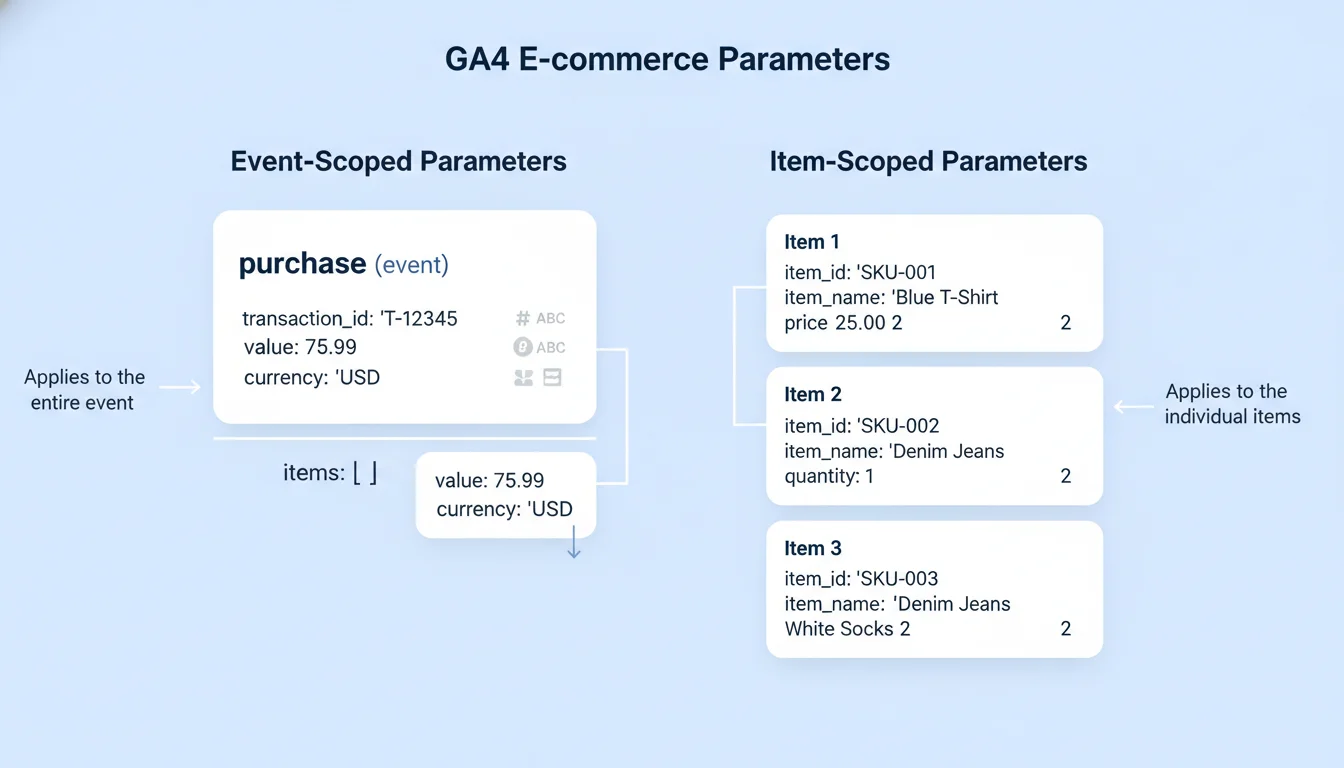
At the heart of GA4 e-commerce tracking is a meticulously structured event taxonomy that dictates exactly how commercial data must be formatted before it is transmitted to Google’s servers. The data model fundamentally bifurcates information into two distinct categories: event-scoped parameters and item-scoped parameters. Understanding the interplay between these scopes is critical for accurate revenue attribution, product performance analysis, and predictive audience generation.
Event-Scoped vs. Item-Scoped Parameters
Event-scoped parameters describe the context of the action itself, operating at the macro level of the user’s interaction. For a terminal purchase event, event-scoped parameters include the overall transaction_id, the total value of the order, tax, shipping, and the currency. The presence of these parameters is not merely recommended; it is mathematically required for the platform to function. For example, if the currency parameter is omitted while sending value data, GA4 cannot accurately compute revenue metrics, leading to critical reporting failures across all monetization dashboards.
Conversely, item-scoped parameters are nested within an items array and describe the specific products or services involved in the event. This structural nesting allows a single event (like a purchase) to contain dozens of individual products, each with its own unique metadata. The items array is highly robust, capable of processing up to 200 elements per event, and accepts up to 27 custom parameters alongside the standard schema to accommodate bespoke business logic. Within any item-related event, either the item_id (typically the Stock Keeping Unit or database ID) or the item_name is strictly required to validate the payload.
The following table delineates the core parameters required within the item-scoped schema and their corresponding functions:
| Parameter | Type | Requirement | Description |
|---|---|---|---|
| item_id | String | Required | The unique identifier or SKU of the product. |
| item_name | String | Required | The explicit nomenclature of the product. |
| price | Number | Recommended | The individual unit price of the product, formatted without currency symbols. |
| quantity | Integer | Recommended | The number of items purchased or engaged with. This value must strictly be an integer. |
| item_brand | String | Optional | The brand classification of the item, allowing for macro-level brand performance reporting. |
| item_category | String | Optional | The primary category of the item. The schema supports up to five hierarchical levels (item_category2 through item_category5) for complex taxonomies. |
| item_variant | String | Optional | The specific variant of the product, such as color, size, or material configuration. |
| index | Number | Optional | The specific integer position of the item as rendered in a dynamic list or search result grid. |
| coupon | String | Optional | Any item-specific discount code applied, independent of event-level order coupons. |
(Note: While marked as required, the schema dictates that either item_id or item_name must be present for the payload to be valid, though best practices mandate the inclusion of both to ensure cross-platform consistency).
The transition from Universal Analytics to GA4 also involved a renaming of several critical parameters. For instance, the UA Enhanced Ecommerce parameter id translates to transaction_id in GA4, revenue translates to value, and currencyCode translates to currency. Data architects must ensure legacy data layers are either completely rebuilt or mapped via variables to align with this modern nomenclature.
Mapping the E-Commerce Funnel
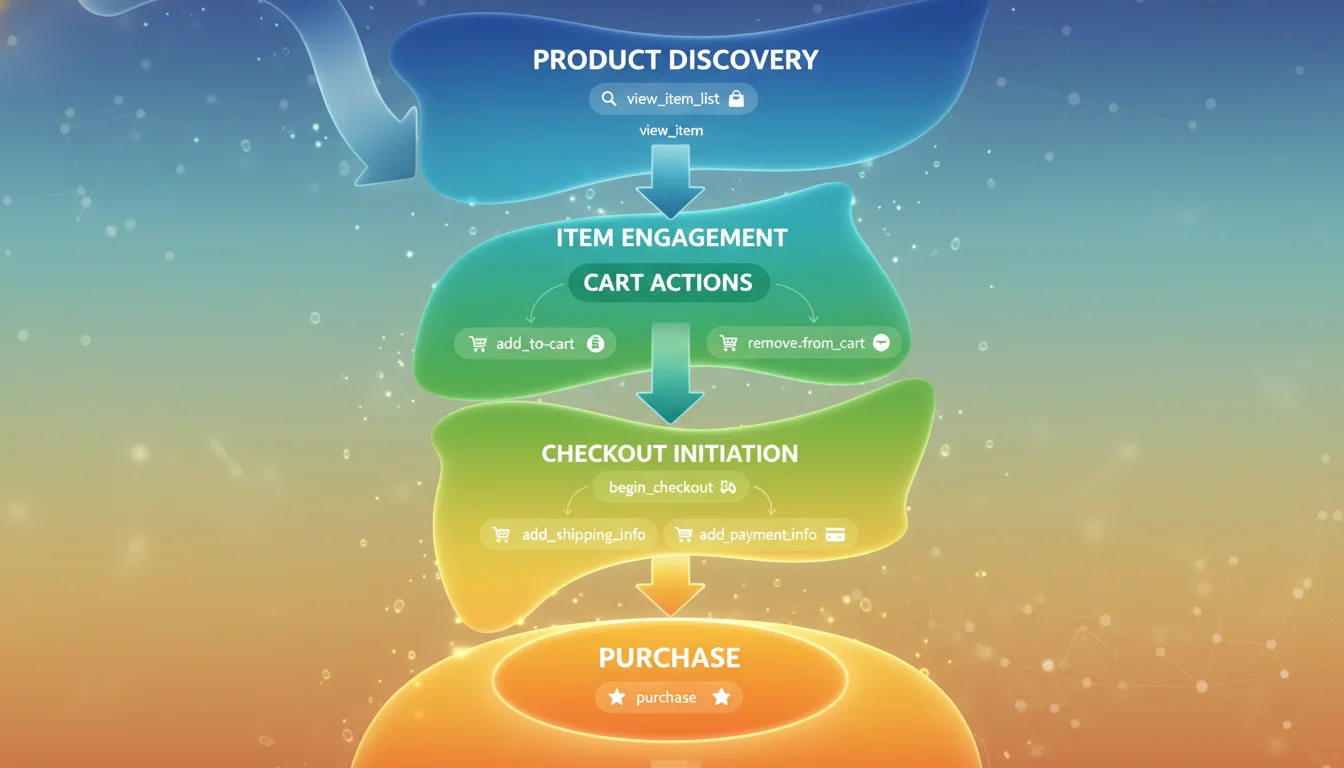
A robust e-commerce implementation measures the entire commercial funnel, capturing user intent from initial product discovery to post-purchase behavior and potential refunds. Google provides a recommended taxonomy of sequentially structured events that serve as the foundation for automated funnel reporting and predictive analytics.
The commercial journey typically begins with product discovery. When a user is presented with a category page, a promotional grid, or search results, the view_item_list event fires, accompanied by an items array detailing every product rendered on the screen. When a user clicks on a specific product within that list to investigate further, the select_item event is triggered. Together, these two events allow analysts to measure the click-through rates of specific merchandise grids and evaluate the effectiveness of product placement algorithms.
Item engagement is formalized by the view_item event, which triggers when a user views a dedicated product detail page. This event serves as the mathematical denominator for calculating view-to-cart conversion rates, a critical Key Performance Indicator (KPI) for evaluating product desirability and pricing strategies.
As users explicitly state their commercial intent, GA4 captures cart and wishlist actions. The add_to_cart, remove_from_cart, and add_to_wishlist events track the accumulation of products, while the view_cart event triggers when the user navigates to the cart summary page. Tracking the removal of items is particularly valuable for identifying price sensitivity or identifying products frequently used for comparison shopping before being discarded.
The checkout journey in GA4 fundamentally abandons the numbered, abstract checkout steps utilized in Universal Analytics in favor of explicit semantic events. The journey is initiated by the begin_checkout event. As the user progresses, GA4 captures add_shipping_info, which allows for the inclusion of a shipping_tier parameter (e.g., “Next Day Air” vs. “Standard Ground”), and add_payment_info, which captures the payment_type parameter (e.g., “Credit Card”, “PayPal”). This granular tracking enables analysts to isolate the exact stage where cart abandonment occurs, highlighting logistical friction such as unpalatable shipping costs or missing payment integrations.
The terminal events of the commercial funnel are purchase and refund. The purchase event is structurally unique within the GA4 ecosystem because it strictly requires a unique transaction_id parameter to function properly and facilitate deduplication. A well-architected implementation will also track promotional performance utilizing view_promotion and select_promotion events. These promotional events require either a promotion_id or promotion_name and can be enriched with creative_name, creative_slot, and location_id parameters to measure the exact return on investment for internal site banners and seasonal sales campaigns. Furthermore, implementing these recommended events correctly enables Google Ads Dynamic Remarketing, allowing the transfer of dynamic attributes directly to advertising platforms for hyper-personalized retargeting experiences.
Data Layer Instrumentation and Tag Management
While GA4 tracking parameters can technically be hardcoded directly into a website’s source code utilizing native gtag.js functions, modern enterprise deployments universally favor Google Tag Manager (GTM) for its flexibility, version control, and separation of engineering concerns. Successful GTM implementation relies entirely on the architectural integrity of the Data Layer—a JavaScript array that temporarily stores structured data payloads before they are routed to analytics endpoints.
The Data Layer Paradigm
The prevailing industry best practice is to prioritize explicit Data Layer pushes (dataLayer.push()) orchestrated by back-end servers over Document Object Model (DOM) scraping. DOM scraping relies on extracting variables directly from the rendered HTML structure (such as reading the text of a price tag class on a webpage).
This methodology renders the tracking setup highly brittle; a simple cosmetic update by a front-end developer, such as changing a CSS class name, can instantly sever the data connection and break the entire analytics architecture. Instead, backend systems should be programmed to push cleanly formatted JSON objects directly into the Data Layer the moment specific commercial actions occur, ensuring data fidelity independent of front-end aesthetics.
When configuring GTM, administrators must map Data Layer Variables (DLVs) to their corresponding GA4 tags. For instance, to configure an add_to_cart tag, the analytics engineer selects the “GA4 Event” tag type, inputs the property’s measurement ID, and specifies the event name. Within the Event Parameters interface, the engineer must map variables such as currency, value, and the exhaustive items array directly to their corresponding Data Layer variables (e.g., mapping the value parameter to ). Triggers are then constructed using Custom Event listeners that monitor the Data Layer for the exact event key (e.g., event: “add_to_cart”).
Custom Dimensions and Metrics
Beyond the standard e-commerce parameters, businesses consistently require bespoke data points to answer specific operational questions. For example, a content-driven e-commerce site might want to track a page_post_author to determine which writers drive the most affiliate sales, or a B2B retailer might need to distinguish between logged-in wholesale buyers and anonymous retail traffic using a user_type parameter.
To utilize these custom parameters in GA4 reporting, they must be explicitly registered in the GA4 administrative interface as Custom Dimensions or Custom Metrics. A parameter sent via GTM but unregistered in the GA4 property settings will be visible in real-time debugging tools but will remain permanently inaccessible in historical reporting tables. Registration involves navigating to the Custom Definitions section, defining the parameter nomenclature, and crucially, assigning it a scope.
The scope dictates how the data is processed and aggregated. Event-scoped dimensions describe the specific action taking place in that exact millisecond. Item-scoped dimensions describe attributes of the specific product. User-scoped dimensions, however, persist across sessions to build a longitudinal profile of the customer. By applying a user-scoped dimension such as user_type, an analyst can permanently filter internal or administrative traffic out of revenue reports, compare long-term conversion rates between guest checkouts and registered loyalty members, and understand how divergent audience segments convert over extended periods. Data architects must also remain cognizant of GA4’s quota limits regarding custom dimensions to ensure critical reporting capacity is not exhausted by trivial parameters.
Platform-Specific Deployments: Shopify and WooCommerce
The implementation methodology for GA4 e-commerce tracking varies drastically depending on the underlying Content Management System (CMS) or e-commerce platform utilized by the enterprise. Shopify and WooCommerce represent two distinct architectural philosophies—hosted Software as a Service (SaaS) versus open-source plugin architectures—each presenting highly unique deployment challenges and technical constraints.
Shopify: The Checkout Extensibility Mandate
Historically, Shopify permitted merchants and analytics engineers to inject JavaScript directly into the checkout.liquid file and the order status page to track conversions. This allowed for highly flexible, albeit inherently insecure, DOM manipulation and event listening. However, driven by escalating security concerns such as Cross-Site Scripting (XSS) vulnerabilities, Payment Card Industry (PCI) compliance, and global data privacy regulations, Shopify officially deprecated checkout.liquid. By early 2026, the migration to “Checkout Extensibility” became mandatory for all merchants across all subscription tiers, fundamentally altering the analytics landscape.
Under the Checkout Extensibility framework, tracking scripts can no longer access the DOM or the raw checkout codebase. Instead, tracking mechanisms are executed within heavily sandboxed iframes utilizing Custom Web Pixels. This sandbox model relies entirely on Shopify’s Web Pixel API, where developers must utilize the analytics.subscribe() method to listen for standardized Customer Events (e.g., checkout_completed, payment_info_submitted) and forward those payloads to external endpoints like GA4.
Merchants navigating this transition generally choose between two primary implementation routes:
- The Google & YouTube App: A native integration provided by Shopify that offers a quick, zero-code setup. This application automatically tracks standard events such as page_view, view_item, add_to_cart, begin_checkout, and purchase. While convenient, native integrations are inherently opaque; administrators cannot customize the event payloads, modify the triggers, or alter the attribution logic encoded within the app.
- Custom Web Pixels via GTM: For advanced enterprise implementations requiring bespoke data manipulation, cross-platform standardization, or server-side routing, merchants deploy GTM infrastructure through Custom Pixels. This allows engineers to retain control over the tag firing sequences and parameter formatting.
A critical, recurring risk in modern Shopify setups is the phenomenon of double-tracking. If a merchant inadvertently utilizes both the native Google & YouTube app and a Custom Pixel GTM configuration concurrently, events like purchase will fire twice per transaction, artificially inflating revenue metrics and skewing conversion rate algorithms. Administrators must strictly select one primary methodology, disable overlapping applications, and utilize tools like Google Tag Assistant to monitor the sandbox environment for duplicate payloads during test orders.
WooCommerce: Plugin-Driven Architecture
In stark contrast to Shopify’s closed, hosted environment, WooCommerce (built on the open-source WordPress framework) relies heavily on third-party plugins and PHP hooks to bridge the gap between the server database and the front-end Data Layer. The most prominent, industry-standard solution for this integration is the Google Tag Manager for WordPress (GTM4WP) plugin.
Implementing sophisticated GA4 tracking on WooCommerce via GTM4WP requires minimal custom coding, provided the store utilizes standard product architectures. The workflow typically involves:
- Plugin Configuration: The administrator inputs the GTM Container ID into the general settings and explicitly enables the “Track Enhanced Ecommerce” option within the integration tab. This internal setting forces the plugin to parse backend PHP product data dynamically and push fully formatted, GA4-compliant events (view_item, add_to_cart, purchase) directly into the Data Layer as users navigate the site.
- Container Import: To exponentially expedite GTM configuration, administrators can download a pre-configured JSON container template provided by GTM4WP developers. Importing this file into the GTM workspace merges dozens of pre-built tags, complex firing triggers, and Data Layer variables, effectively eliminating the need for manual variable mapping and reducing deployment time from days to minutes.
While free plugins like GTM4WP handle standard retail operations efficiently, they frequently exhibit severe limitations when confronted with complex product catalogs. Many free solutions fail to accurately track variable products (e.g., items with dozens of size and color permutations resulting in dynamic pricing changes) or recurring subscription renewals, which execute completely offline without a browser session. For stores utilizing these complex revenue models, premium plugin upgrades or custom server-to-server data pipelines are an absolute necessity to maintain enterprise-grade accuracy.
Client-Side vs. Server-Side Tagging Infrastructure
As global browser privacy restrictions aggressively tighten, the traditional methodology of client-side tracking—where the user’s browser communicates directly with Google Analytics and advertising servers—has become increasingly vulnerable and unreliable. This systemic deterioration of data fidelity has driven the rapid, industry-wide adoption of Server-Side Google Tag Manager (SGTM) architectures for high-volume e-commerce tracking.
Vulnerabilities of Client-Side Tracking
In a traditional client-side model, the JavaScript tracking tags execute entirely within the user’s browser environment. This structural design exposes the data collection process to numerous, often insurmountable, client-side interferences:
- Ad Blockers and Privacy Extensions: Consumer adoption of ad-blocking tools and privacy-focused browsers (such as Brave) has skyrocketed. These tools rely on massive blacklists to easily identify and block outgoing HTTP requests to known analytics domains (like google-analytics.com), routinely resulting in a 10% to 30% loss of critical conversion data for the merchant.
- Intelligent Tracking Prevention (ITP): Browsers spearheaded by Apple’s Safari and Mozilla’s Firefox natively restrict the lifespan of third-party cookies, and increasingly, limit first-party cookies set via JavaScript to a mere 24 hours to 7 days.
This aggressive expiration severs the attribution link between early-stage marketing touchpoints and eventual purchases, degrading the accuracy of cross-channel return on ad spend (ROAS) reporting.
- Performance Degradation: Loading dozens of vendor scripts (Google, Meta, TikTok, Criteo) concurrently in the browser drastically increases page load times and main-thread blocking, negatively impacting user experience and actively harming Core Web Vitals, which influences SEO rankings.
The Server-Side Solution
Server-side tracking fundamentally reroutes this data flow to bypass client-side limitations. Instead of the browser dispatching data to a dozen different marketing platforms, it sends a single, consolidated stream of data to a dedicated server controlled by the merchant (often deployed via a first-party custom subdomain, such as metrics.yourbrand.com). This server, acting as a highly secure HTTP API endpoint, receives the payload, processes and cleanses it, and securely dispatches it from the server directly to GA4, Meta Conversions API, and other third-party vendors. Cloud infrastructure tools like the Stape Gateway or native Google Cloud Platform environments facilitate this robust architecture.
The architectural advantages of SGTM are profound and represent the future of digital measurement:
| Aspect | Client-Side Tracking | Server-Side Tracking |
|---|---|---|
| Data Quality & Reliability | Highly affected by ad blockers, network timeouts, and browser ITP restrictions. | Highly reliable; bypasses client-side blocks by utilizing a first-party collection endpoint. |
| Data Governance & Privacy | Low control; data flows directly from the user to third parties, exposing IPs and user agents. | High control; servers act as proxies, allowing administrators to strip PII before routing data, aiding GDPR compliance. |
| Implementation Complexity | Simple; relies on copying and pasting tracking codes or utilizing basic GTM web containers. | Complex; requires provisioning server infrastructure, DNS configuration, and custom loader scripts. |
| Financial Cost | Lower upfront costs; primarily involves internal labor or basic agency fees. | Higher initial investment and ongoing monthly server maintenance/hosting fees. |
| Site Performance | Heavier load on the user’s device, slowing down rendering times. | Significantly faster; shifts the processing burden off the user’s device to the cloud. |
Furthermore, the server container can intercept the data stream and dynamically enrich it with offline data extracted via APIs from a Customer Relationship Management (CRM) system before dispatching it to GA4. This powerful capability allows for the integration of highly sensitive post-purchase data, such as true profit margins, real-time inventory levels, or lead scoring algorithms, which absolutely cannot be securely exposed within the client-side Data Layer.
Despite these overwhelming benefits, server-side tagging introduces higher financial costs and demands advanced technical expertise for deployment, monitoring, and maintenance. Comparative studies between synchronized client and server deployments often show highly similar transaction volumes in the immediate short term (e.g., less than a 1% variance in total recorded purchases when testing side-by-side), but the true strategic value of SGTM lies in its resilience against future, inevitable browser restrictions and its unparalleled capacity for sophisticated data governance and privacy enforcement.
Privacy Regulations and Google Consent Mode v2
The escalating regulatory landscape, spearheaded by the General Data Protection Regulation (GDPR) in the European Economic Area (EEA) and the recent enforcement of the Digital Markets Act (DMA), has precipitated major structural changes to how GA4 is legally permitted to operate. In 2024 and expanding globally through 2026, explicit, informed user consent is legally mandated before any analytics or advertising cookies can be deployed on a user’s device. To bridge the widening gap between strict privacy compliance and the commercial need for data visibility, Google introduced Consent Mode v2.
Basic vs. Advanced Implementation Strategies
It is crucial to understand that Consent Mode v2 is not a replacement for a Consent Management Platform (CMP); rather, it acts as a complex API signaling mechanism that communicates the user’s explicit consent status (granted or denied for specific purposes like analytics or ad storage) to the firing Google tags. The implementation strategy generally falls into two distinct categories, each with massive implications for data availability:
- Basic Consent Mode: Under this strict configuration, if a user denies consent via the CMP banner, all Google tags are completely blocked from executing. No data whatsoever is sent to GA4 or Google Ads. This approach prioritizes absolute, undeniable legal caution but results in severe data blindness, consistently leading to a 30% to 50% drop in reported metrics, effectively crippling attribution models and remarketing campaigns.
- Advanced Consent Mode: Under this nuanced configuration, if a user denies consent, GA4 tags are still permitted to fire, but they programmatically strip all identifying information (such as cookies, client IDs, and IP addresses). Instead of setting persistent identifiers, they send anonymized “cookieless pings” containing only basic event triggers and timestamp data.
Behavioral Modeling and Data Recovery
The primary, transformative advantage of implementing Advanced Consent Mode is its integration with GA4’s proprietary machine learning algorithms. By analyzing the rich, observable behavior of users who grant consent and cross-referencing it with the high-volume, anonymous pings generated by unconsented users, GA4 utilizes sophisticated stochastic modeling to mathematically reconstruct the missing data. This advanced modeling allows enterprise businesses to maintain a highly accurate view of overall transaction volumes, conversion rates, and channel performance without violating user privacy or relying on illegal tracking mechanisms.
However, this behavioral modeling is entirely reliant on strict data volume thresholds to ensure statistical accuracy. If a website does not generate enough daily traffic to train the machine learning models effectively, the modeling will fail to activate. In these restrictive scenarios, businesses transitioning to Consent Mode v2 have reported devastating data losses, sometimes observing a catastrophic 90% to 95% drop in measured sessions and users within the GA4 interface.
For small to mid-sized businesses falling below these volume thresholds, Consent Mode v2 serves strictly as a compliance mechanism rather than a data recovery tool. In response, digital strategists and data architects must pivot to utilizing deterministic, first-party data strategies. This involves building direct email lists and heavily relying on “Offline Conversion Imports,” where verified backend sales data is manually or programmatically uploaded directly into Google Ads via the Measurement Protocol to verify attribution and train bidding algorithms without relying on fragile, client-side browser data.
Advanced Reporting, Explorations, and Discrepancy Resolution
While engineering a resilient data collection infrastructure is the foundational requirement, the ultimate value of GA4 lies in data synthesis, visualization, and insight generation. GA4 provides standard built-in reports for quick overviews, but analysts rely heavily on the advanced “Explore” module for deep, granular, and predictive analysis.
Standard Monetization Reports
The native “Monetization” suite offers immediate, high-level visibility into commercial performance. The “Monetization Overview” acts as an executive dashboard, summarizing macro trends such as total revenue, new purchaser counts, and coupon utilization rates. The “Ecommerce Purchases” report is highly effective for item-level analysis, allowing merchandisers to evaluate individual product performance by juxtaposing item views against add-to-carts and finalized purchases. Furthermore, e-commerce data natively enriches standard acquisition reports, allowing administrators to assess the exact revenue generated by specific traffic channels (e.g., Organic Search vs. Paid Social), establishing clear ROAS benchmarks.
Revenue Metric Distinctions and Discrepancies
A pervasive challenge and frequent source of analytical error is the presence of three distinct revenue metrics in GA4: Total Revenue, Purchase Revenue, and Item Revenue. Misunderstanding their specific scopes inevitably leads to flawed financial analysis and misaligned marketing budgets.
| Metric | Scope | Definition |
|---|---|---|
| Total Revenue | Aggregate | The overarching sum of all revenue streams. This comprehensively includes direct purchases, recurring in-app subscriptions, and advertising revenue, while automatically deducting the value of properly tracked refund events. |
| Purchase Revenue | Event-Level (Order) | The total monetary value of all items within a specific transaction event, effectively representing the aggregated shopping cart total. This is the metric most commonly utilized for session-level attribution. |
| Item Revenue | Item-Level (Product) | The gross revenue generated by a specific, individual product isolated from the rest of the cart. |
Massive discrepancies frequently emerge when these differing scopes are combined inappropriately in custom explorations.
For instance, if a retailer utilizes a loyalty program where accumulated points are redeemed for a product, the overall Total Revenue (event scope) might reflect the full market value of the items, whereas the Item Revenue (calculated directly from the items array) might accurately reflect that only a negligible fraction of real currency was actually exchanged. This architectural nuance requires marketers to explicitly filter reports by Item Revenue and collaborate with developers to send custom coupon_value or discount_type parameters when assessing true cash-based performance versus gross merchandise value.
The Funnel Exploration Technique
To identify microscopic friction points within the user journey, administrators utilize the Funnel Exploration tool. Unlike the rigid, pre-defined “Shopping Behavior” and “Checkout Behavior” reports of Universal Analytics, GA4 funnels are built entirely on the fly and are highly customizable.
A standard e-commerce funnel requires defining sequential steps based on the core taxonomy deployed via GTM: Step 1 (view_item), Step 2 (add_to_cart), Step 3 (begin_checkout), and Step 4 (purchase). Administrators can configure these steps with advanced parameters to extract deeper insights:
- Open vs. Closed Funnels: A closed funnel dictates that a user is only counted in the visualization if they enter at the absolute first defined step (e.g., viewing an item). An open funnel allows users to enter the visualization at any intermediate step (e.g., navigating directly to the checkout page via an abandoned cart email recovery link).
- Time Constraints: Analysts can apply stringent time parameters to evaluate process efficiency, dictating that a user must transition from add_to_cart to purchase within a specific chronological window (e.g., 10 minutes) to be considered successful.
- Breakdowns and Segments: By applying standard dimensions such as device_category or first_user_source, analysts can instantly isolate which hardware platforms (Mobile vs. Desktop) or marketing campaigns experience the highest funnel abandonment rates, directing UX resources to the exact point of failure.
Advanced Exploration Formats
Beyond standard linear funnels, GA4 offers diverse exploration techniques to uncover hidden behavioral patterns. Free-form explorations operate similarly to advanced pivot tables, allowing users to cross-tabulate custom dimensions. For example, by dragging the item_promotion_name dimension against purchase metrics, analysts can definitively attribute exact revenue figures to specific internal banner ads or hero carousels.
Path explorations allow administrators to map organic user flows forward from a specific event or backward from a terminal conversion, revealing unexpected navigation patterns, search behaviors, or looping behaviors that users engage in prior to checking out. Additionally, User Lifetime Value (LTV) explorations and Cohort Analysis map the long-term revenue generated by specific groups of users acquired during defined timeframes or through specific marketing channels, shifting the focus from immediate acquisition cost to long-term customer profitability.
Data Integrity, Deduplication, and Diagnostic Methodologies
Even with a theoretically perfect architecture, maintaining data integrity requires constant vigilance. Reconciling the data reported in GA4 with the actual financial data recorded in backend CRM or e-commerce databases is a universal challenge. Total parity is mathematically impossible due to fundamental differences in processing logic between browsers and servers, but understanding the precise sources of variance is critical for maintaining organizational trust in the analytics data.
The Challenge of Duplicate Transactions
Duplicate transactions represent the most pervasive and destructive threat to data integrity, artificially inflating revenue metrics, crippling conversion rate accuracy, and triggering excessive bidding from connected Google Ads algorithms. This duplication typically stems from several common architectural flaws:
- Multiple Tracking Snippets: A frequent error during migration is installing the GA4 base snippet directly in the site header codebase while simultaneously deploying a GA4 configuration tag via Google Tag Manager. This dual-deployment triggers every payload twice simultaneously.
- Thank You Page Reloads: If a purchase event is tied exclusively to the loading of an order confirmation page (without utilizing session storage or cookie blocking logic), a user refreshing that page, or bookmarking it to check their order status days later, will trigger a duplicate conversion event.
- GA4 “Create Event” Misconfigurations: GA4 features a powerful UI tool allowing administrators to create or modify events directly within the platform based on incoming parameters. If an engineer builds a trigger in GTM to send an event, and a marketer simultaneously builds a rule in the GA4 UI to duplicate that event based on a page view, it creates redundant data that degrades reporting.
- Client/Server Overlap: If both a client-side tag and a server-side container are actively running and misconfigured to send the same transaction without proper routing or exclusion logic, the events will overlap in the reporting interface.
Native Deduplication via Transaction ID
To systematically mitigate these issues, GA4 relies on a native deduplication engine driven entirely by the transaction_id parameter. If GA4 receives multiple purchase events bearing the exact same transaction_id from the same user session, it will discard the duplicates and record only a single transaction in the standard reporting UI. This mechanism is crucial for cleaning up accidental page reloads.
However, administrators must note that sending an empty string (transaction_id=””) disables this protective feature entirely; GA4 will indiscriminately deduplicate all empty-string purchases, effectively deleting valid transactions and destroying the dataset. Furthermore, while the transaction_id resolves many front-end reporting issues in the UI, analysts utilizing the raw BigQuery export will still see the duplicate events documented in the raw database, as BigQuery ingests the unfiltered, real-time event stream directly.
Back-End vs. Front-End Discrepancies
Even assuming perfect deduplication, GA4 front-end data will inherently differ from backend CRM data due to timing and validation logic. A CRM only logs a transaction after payment gateways process the credit card and explicitly authorize the transfer of funds. GA4, operating as a front-end listener, typically logs the purchase the millisecond the confirmation page begins to render. If a user experiences a payment failure, a server timeout, or closes the browser window milliseconds before the page fully resolves, GA4 may over-report or under-report the transaction relative to the backend system.
Furthermore, GA4 implements a hard session limit of 500 hits. If a highly engaged user browsing a massive catalog exceeds this event limit before completing checkout, the transaction may be dropped from the analytics stream entirely, whereas the CRM will successfully capture it regardless of session length. To narrow this inevitable gap, analytics engineers dictate firing the purchase event exclusively via server-side Webhooks or Measurement Protocol API calls after server-side payment validation confirms the transaction, completely removing the browser from the conversion recording process.
Validation and Quality Assurance Workflows
Given the immense complexities of the event schema, parameter mapping, and platform routing, deploying GA4 e-commerce tracking requires rigorous, multi-layered Quality Assurance (QA) protocols. Administrators must never assume a deployment is successful until it is mathematically validated across multiple diagnostic tools.
- GTM Preview Mode: This is the absolute first line of defense. Preview mode allows engineers to simulate user interactions on a staging site and observe exactly which tags fire, which triggers are evaluated, and critically, the exact nested structure of the Data Layer payload. If an items array is malformed, missing a required item_id, or nested incorrectly, it will be visible here before the corrupt data is transmitted to GA4.
- Browser Developer Tools (Network Tab): Relying purely on Google’s provided interfaces is insufficient, as the tools themselves can suffer from latency or known bugs (such as those documented in the GA4 Debugger extension). Professional analysts utilize the browser’s “Network” tab, explicitly filtering for collect? requests. This exposes the raw HTTP payload being dispatched directly to Google’s servers, allowing line-by-line verification of every parameter appended to the network request. Third-party extensions, such as the DataLayer Inspector, provide further clarity on the payloads being generated.
- GA4 DebugView: Within the GA4 administrative interface, DebugView provides a real-time, chronological feed of incoming events originating exclusively from devices with debug mode enabled. Analysts must click into the simulated purchase event to ensure all parameters (value, currency, item arrays, transaction IDs) are actively being registered and correctly parsed by the property.
A standard, exhaustive auditing framework involves executing a complete mock transaction: traversing from category pages to product views, adding multiple items to the cart, navigating the various checkout nodes, applying dummy promotional codes, and finalizing the mock payment.
Only after confirming the presence, sequence, and structural integrity of the entire suite of e-commerce events across the Network tab, GTM Preview, and GA4 DebugView can a deployment be considered stable. Even then, a 48-hour secondary check of the processed Monetization reports is strictly required to confirm that the data has fully cascaded from real-time processing into the historical UI. By adhering to these rigorous diagnostic standards, organizations can ensure their GA4 architecture provides the uncompromised data fidelity required to drive advanced e-commerce strategies.