Digital Tools for Development Professionals: Boost Impact

Digital Tools for Development Professionals: Boost Impact
Executive Summary
This report outlines “Empowerment Through Action,” a proposed campaign designed to equip development professionals with essential digital tools for enhanced efficiency, collaboration, and impact. The campaign focuses on Trello for project management, Google Forms for data collection and monitoring, Zapier/Make.com for workflow automation, and Canva for visual communication. By adopting a hands-on, scenario-based training approach coupled with robust change management strategies, this initiative aims to cultivate a digitally proficient workforce. The anticipated benefits include streamlined operations, improved data utilization, elevated stakeholder engagement, and ultimately, greater programmatic success in the dynamic development sector.
1. The Digital Imperative in Development: Opportunities and Challenges
The global development sector is undergoing a profound transformation driven by digital technologies. These advancements offer immense potential for humanitarian assistance and development initiatives to operate with greater efficiency and effectiveness. However, this shift also presents unique challenges, particularly concerning user adoption and the potential for digital fatigue.
1.1. Current Landscape of Digital Tool Utilization in NGOs
Many non-governmental organizations (NGOs) are actively embracing digital tools across various operational domains. For instance, UNICEF has extensively integrated Trello into its operations for monitoring and evaluation (M&E), field coordination, and comprehensive program reporting. This adoption has provided a “single source of truth,” fostering transparency and flexibility across multiple projects and diverse geographical locations. Similarly, DoSomething.org leverages Trello for project tracking and planning across its marketing, product, and engineering teams, further enhancing efficiency through integration with Zendesk for user support.
Google Forms has also found widespread application in education, research, and non-profit sectors. Its value stems from its user-friendliness, mobile accessibility, and seamless integration with Google Sheets, enabling real-time data analysis. This facilitates critical M&E activities and data-driven decision-making within development programs.
Furthermore, no-code automation platforms such as Zapier and Make.com are increasingly being adopted by NGOs. These platforms enable organizations to automate key processes, significantly reducing manual tasks and optimizing operations without requiring extensive technical coding skills. Make.com, for example, offers a 12-month free license specifically for NGOs, underscoring its commitment to supporting the sector’s digital growth.
In the realm of communication and outreach, Canva is democratizing design capabilities for NGOs. This platform empowers non-designers within these organizations to create professional visual content for storytelling, impactful reports, and various communication campaigns. This visual communication is crucial for effectively engaging stakeholders and securing donor support.

1.2. Understanding and Mitigating Digital Fatigue and Resistance
Despite the clear advantages, the rapid proliferation of digital tools can inadvertently lead to what is known as “digital fatigue.” This condition manifests as physical and mental exhaustion resulting from excessive exposure to technology and the cognitive overload associated with constantly switching between numerous fragmented software applications. Such intellectual strain can significantly impair employee productivity and creativity.
This fatigue often contributes to a broader resistance to adopting new technologies within organizations. This resistance commonly stems from a “fear of the unknown,” a lack of clear vision regarding the technology’s purpose, insufficient training, and concerns about job security. For instance, organizations like USAID have encountered challenges related to fragmented and non-interoperable digital systems, which can hinder effective implementation.
Addressing these challenges requires a strategic approach. Solutions include streamlining workflows by adopting integrated, “all-in-one” solutions that centralize functionalities and reduce the need for constant context switching. Transparent and continuous communication about the rationale behind technological changes—the “why”—is also vital for fostering acceptance. Early involvement of employees in the adoption process and providing comprehensive, tailored training are equally critical steps to mitigate resistance and ensure a smoother transition.
A critical observation is the interconnectedness of software fragmentation, digital fatigue, and resistance to change. When development professionals are already overwhelmed by navigating disparate tools and constantly switching between applications, their cognitive capacity becomes saturated. Introducing new tools without addressing this underlying fragmentation can exacerbate existing fatigue, making individuals less receptive to adoption. They may perceive new software as an additional burden rather than a solution, leading to increased resistance. Therefore, any digital empowerment campaign must emphasize the benefits of integration and streamlined workflows as a core value proposition, moving beyond merely showcasing individual tool features.
Furthermore, automation emerges as a powerful counter-fatigue strategy. The manual, repetitive tasks that contribute significantly to cognitive overload and digital fatigue can be directly addressed by no-code automation platforms. By offloading routine work, these tools free up mental energy, reducing the “friction” associated with daily digital interactions. This not only enhances efficiency but also improves employee well-being and fosters a more positive attitude towards digital adoption.
Finally, the strategic push towards a “digital by default” approach, as seen in organizations like USAID, underscores the necessity for robust capacity building. While such a policy aims to enhance efficiency, it faces inherent challenges like the “digital divide” and existing fragmented systems. Without a comprehensive, bottom-up capacity-building campaign that explicitly addresses these barriers through training and support, the “digital by default” stance risks increasing inequalities and inefficiencies rather than achieving its intended positive impact. The “Empowerment Through Action” campaign is designed to align with and actively support this strategic shift by building the necessary human capacity and addressing systemic challenges.
2. Core Digital Tools for Development Professionals: Capabilities and Case Studies
This section details the selected digital tools, outlining their specific features and demonstrating their relevance through real-world applications in the development sector. These tools, when integrated, form a powerful digital ecosystem for development professionals.
2.1. Trello: Streamlining Project Management and Collaboration
Trello is a highly visual project management tool built around the Kanban methodology, utilizing boards, lists, and cards to organize work. Its core capabilities include checklists, due dates, labels for categorization, and a wide array of Power-Ups that allow for integrations with other applications. Trello also offers various views, such as Timeline, Table, and Calendar views, enabling users to manage projects from different perspectives.
Development Use Cases:
- Project Tracking & Coordination: UNICEF has effectively utilized Trello to manage numerous projects across different countries, establishing a “single source of truth” that enhances transparency and coordination for remote teams. It helps centralize information on locations, contacts, and critical documents.
- Monitoring & Evaluation (M&E) and Reporting: Trello serves as a valuable tool for M&E tracking, program reporting, and grant management. Teams can organize data, monitor progress, and ensure accountability to stakeholders.
- Team Communication & Field Operations: The platform facilitates seamless communication within diverse teams, including field staff, by centralizing discussions and tasks. This significantly reduces reliance on cumbersome email threads, improving clarity and efficiency.
- Volunteer Management: Non-profit organizations like DoSomething.org leverage Trello for managing campaigns and volunteer engagement, streamlining their support processes and ensuring frictionless participation.
Trello’s simple board-list-card structure is remarkably easy for team members to adopt, even those without formal project management training. Its visual and flexible nature empowers teams to organize and prioritize work effectively, making it a highly accessible tool for diverse development teams.
2.2. Google Forms: Enhancing Field Data Collection and M&E
Google Forms is a free, cloud-based tool designed for creating surveys, quizzes, and various data collection forms through an intuitive drag-and-drop interface. It supports a wide range of question types, including multiple choice, checkboxes, dropdowns, short and long answers, file uploads, linear scales, and grids. Crucially, it allows for conditional logic, enabling dynamic forms that adapt questions based on previous responses. Forms are inherently mobile-friendly, ensuring accessibility from any device, which is vital for field operations.
Development Use Cases:
- Field Data Collection: Google Forms is widely used for collecting data from beneficiaries, conducting surveys in rural areas, and gathering information directly in the field where mobile access is paramount.
-
Monitoring & Evaluation (M&E): It is a critical component of M&E practices in NGOs, facilitating systematic data collection for comprehensive project performance assessment.
- Case studies highlight its utility for student surveys and organizing events.
- Feedback & Assessments: The tool is ideal for collecting feedback on training sessions and conducting employee performance evaluations. It can also be configured to create quizzes for skill assessments.
- Integration with Google Sheets: Responses are collected instantly and automatically stored within Google Forms or exported directly to Google Sheets for real-time analysis and reporting. This seamless integration facilitates deeper data analysis and the creation of comprehensive final reports.
Google Forms’ simplicity, user familiarity, and mobile accessibility make it a non-intimidating tool for a diverse user base, including field staff. Its direct integration with Google Sheets transforms raw data into actionable information, supporting data-driven decision-making in real-time.
2.3. Zapier/Make.com: Automating Workflows for Operational Efficiency
Zapier and Make.com are powerful no-code/low-code automation platforms that connect thousands of disparate applications to create automated workflows. Users can define “triggers” (events that initiate a workflow) and “actions” (events performed subsequent to a trigger). These platforms enable the automation of daily operations without requiring any coding, significantly reducing reliance on IT departments.
Development Use Cases:
- Data Synchronization & Reporting: These tools automate the synchronization of data between different systems (e.g., CRM and billing), push leads from forms into email workflows, or track conversions across platforms. They can also generate automated reports from collected data.
- Application & Onboarding Processes: A notable example is the non-profit “One More Day,” which built its entire application management system on Zapier. This transformed a 150-hour manual process into a highly streamlined, automated workflow, completed in just five hours. The system handles capturing applications, storing information, sharing with teams, managing voting, and tracking progress.
- Notifications & Alerts: Automated email notifications can be configured based on specific triggers, such as new survey submissions or critical data entries.
- Customer/Beneficiary Support: Automation can streamline support escalations or efficiently manage top-of-funnel leads, improving responsiveness.
Automation platforms deliver significant time and resource savings, allowing NGOs to reallocate focus to their core mission rather than being bogged down by administrative tasks. This increases overall efficiency, minimizes manual errors, and provides crucial scalability, particularly for organizations operating with limited budgets and IT staff. Make.com’s dedicated program for NGOs further highlights its utility and commitment to supporting the development sector.
2.4. Canva: Elevating Visual Communication and Impact Reporting
Canva is a user-friendly graphic design platform characterized by its intuitive drag-and-drop interface and an extensive library of templates, images, and design elements. It empowers users to create professional-grade content without requiring advanced design skills. Key features include Brand Kits for maintaining visual consistency, collaborative tools for team projects, and seamless social media integration. Recent advancements, such as AI-powered tools for content generation and “Visual Suite 2.0,” enable users to mix various formats within a single document, further enhancing creative possibilities.
Development Use Cases:
- Impact Reporting & Storytelling: Canva is indispensable for communicating an NGO’s mission and impact through visually compelling infographics, posters, videos, and professional annual or impact reports. This visual approach is vital for building trust and inspiring action from donors and stakeholders.
- Program Updates & Awareness: The platform facilitates the creation of engaging content for social media campaigns, newsletters, and event promotions, effectively spreading awareness and engaging diverse audiences.
- Presentations & Training Materials: Users can develop impactful presentations for training volunteers, pitching to donors, or providing updates to stakeholders.
- Fundraising Campaigns: Canva enables the design of eye-catching fundraising requests, event posters, and email headers, crucial for successful fundraising initiatives.
Canva democratizes design, allowing individuals without formal design training to produce high-quality visual content. This capability is particularly important for effective communication in the competitive landscape of the development sector. Its freemium model and specific program for non-profits make it highly accessible and cost-effective. The integration of AI further enhances efficiency in content creation, allowing for rapid generation and refinement of visuals.
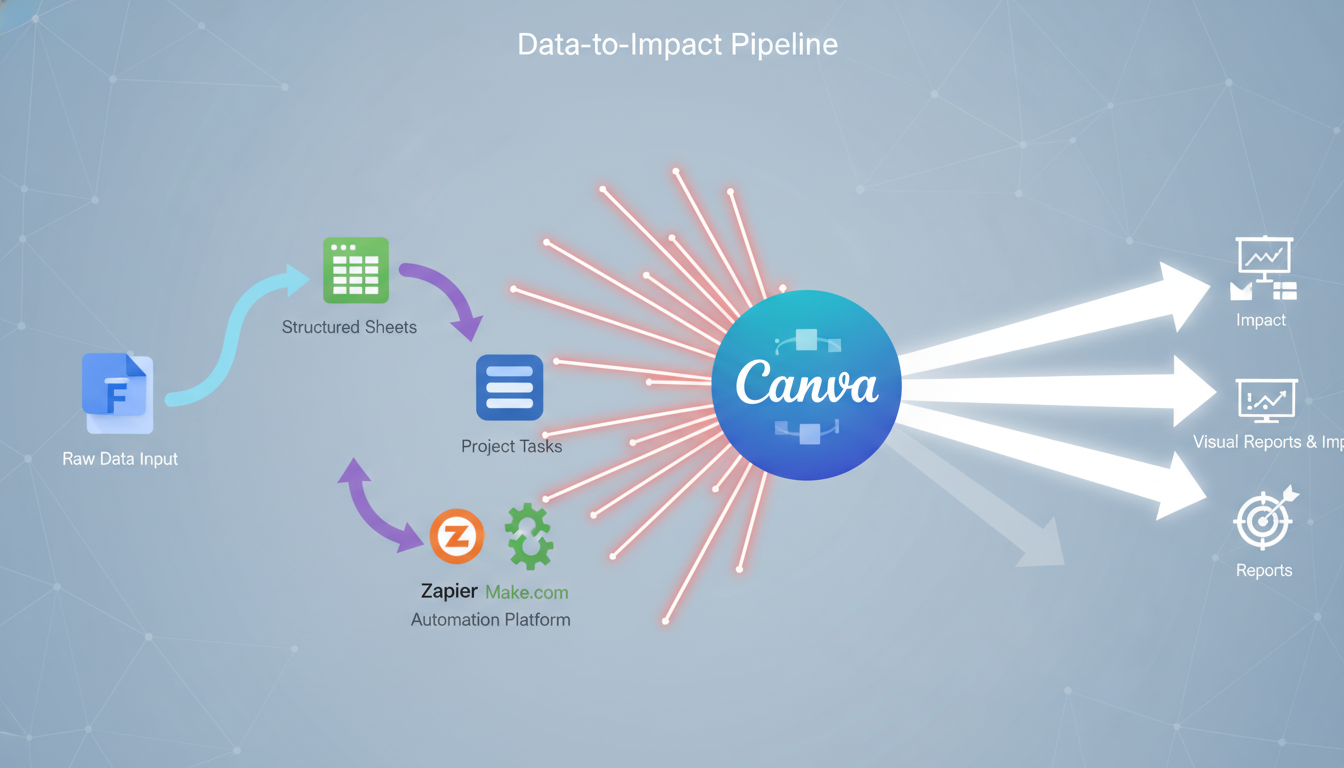
A significant implication of these tools working together is the strategic value of an integrated toolset for a complete data-to-impact pipeline. Google Forms excels at collecting raw data, which is then seamlessly transferred to Google Sheets for analysis. Automation platforms like Zapier or Make.com can then automate the flow of this data and trigger subsequent actions, such as creating project tasks in Trello. Finally, Canva allows for the compelling visualization and communication of the insights derived from this data for impact reporting. This integrated workflow demonstrates how raw field data can be transformed into compelling donor reports, maximizing programmatic efficiency and accountability. The campaign’s training should not treat these tools in isolation but rather demonstrate their interoperability to foster a cohesive digital ecosystem.
Beyond mere efficiency gains, these digital tools serve as crucial enablers of adaptability and responsiveness in the dynamic development sector. Trello’s inherent flexibility allows for new workflows to be rapidly invented as needed, facilitating quick responses to emergencies, as demonstrated by UNICEF’s experience during crises. Google Forms’ real-time data collection capabilities provide immediate insights for timely decision-making. Similarly, automation platforms accelerate the deployment of solutions and enable quick adjustments to evolving regulations. This collective capability means that these tools do not merely make existing processes faster; they empower organizations to be more agile and responsive to changing contexts and emerging challenges, which is critical for success in unpredictable environments. The training should therefore frame these tools not just as productivity enhancers, but as essential components for organizational resilience and adaptive management.
Table 1: Digital Tool Capabilities & Development Use Cases
Digital Tool
Key Capabilities
Development Use Cases (Examples)
Relevant References
Trello
Kanban boards, lists, cards, checklists, due dates, labels, Power-Ups, multiple views (Timeline, Table, Calendar)
Project management, M&E tracking, field coordination, program reporting, team communication, volunteer management, grant tracking
Google Forms
Customizable forms, diverse question types (text, multiple choice, file upload, grids), conditional logic, mobile-friendly, real-time response collection, integration with Google Sheets
Field data collection, M&E surveys, beneficiary feedback, training evaluations, event registration, internal data gathering
Zapier/Make.com
No-code workflow automation, app integration (triggers & actions), data synchronization, task automation, custom interfaces (Zapier Interfaces/Tables)
Automating data flow between tools, streamlined application processes, automated notifications/alerts, reducing manual reporting, lead management, onboarding workflows
Canva
Drag-and-drop design, extensive templates, stock library, Brand Kits, collaborative features, AI-powered design, Visual Suite 2.0
Creating impact reports, visual storytelling, program update visuals, marketing materials, social media content, presentations, infographics, event announcements
3. “Empowerment Through Action”: A Hands-On Training Campaign Framework
The “Empowerment Through Action” campaign is designed to provide development professionals with practical, hands-on experience in leveraging key digital tools. This framework outlines its structure, modules, and experiential learning approach.
3.1.
Campaign Vision and Expected Outcomes
Vision: To cultivate a digitally empowered workforce within development organizations, where professionals confidently leverage integrated digital tools to enhance project efficiency, collaboration, data utilization, and communication of impact, ultimately driving greater programmatic success.
Expected Outcomes (SMART Objectives)
- Increased Proficiency: 80% of trained professionals will demonstrate proficiency in core functionalities of Trello, Google Forms, Zapier/Make.com, and Canva, as measured by post-training assessments and practical exercises.
- Enhanced Collaboration: Teams utilizing Trello will report a 25% improvement in project coordination and communication efficiency within three months post-training, as evidenced by internal surveys and project progress reports.
- Improved Data Utilization: Field teams will increase their use of Google Forms for data collection by 50%, and program managers will utilize Google Sheets for M&E data analysis in 75% of new projects, leading to more timely and accurate reporting.
- Streamlined Operations: Identify and automate at least one key repetitive workflow per department using Zapier/Make.com within six months, resulting in a measurable reduction in manual administrative hours.
- Elevated Communication: Teams will produce at least two visually compelling impact communication pieces (e.g., infographics, short videos) using Canva per quarter, leading to a 15% increase in stakeholder engagement metrics (e.g., report downloads, social media shares).
Pre-Training Needs Assessment and Customization
Before the campaign launch, a comprehensive skills gap analysis will be conducted to understand the current digital literacy levels and specific pain points across different roles and departments. This assessment can involve surveys, interviews with department leaders, and a review of existing key performance indicators (KPIs). The insights gained will inform the tailoring of training materials and scenarios to address identified needs and the specific contexts of development projects. This customization ensures relevance and significantly increases participant engagement. Additionally, pre-training materials or assignments will be prepared and distributed to set expectations and introduce basic concepts, preparing participants for the immersive learning experience.
Module 1: Collaborative Project Management with Trello
Learning Objectives:
Participants will be able to set up and manage project boards, create and assign tasks, utilize checklists and due dates, and effectively communicate within Trello for project coordination.
Hands-On Activities & Scenarios:
- Scenario: “Rapid Response to a Humanitarian Crisis,” drawing inspiration from UNICEF’s effective use of Trello during the Irma hurricane response.
- Activity: Participants, organized into small groups, will collaboratively set up a Trello board for a simulated emergency response project. They will define various lists (e.g., “Needs Assessment,” “Logistics,” “Field Teams,” “Donor Reporting,” “Done”), create cards for critical tasks (e.g., “Procure emergency supplies,” “Deploy medical team to X village,” “Collect beneficiary data”), assign team members to specific tasks, add due dates, and utilize checklists for managing sub-tasks.
- Focus: The session will emphasize Trello’s visual nature for quick oversight and transparency, and its practical utility for efficient field team communication.
- Discussion: Facilitated discussions will explore how Trello’s flexibility supports agile adaptation in dynamic project environments, reflecting real-world challenges in development work.
Module 2: Efficient Data Collection & M&E with Google Forms
Learning Objectives:
Participants will be able to design mobile-friendly data collection forms, apply conditional logic, collect responses in real-time, and export/link data to Google Sheets for basic analysis.
Hands-On Activities & Scenarios:
- Scenario: “Baseline Data Collection for a Rural Development Program,” inspired by the critical role of M&E in NGO projects.
- Activity: Participants will design a Google Form for a simulated field survey (e.g., a household needs assessment or post-distribution monitoring form). They will incorporate various question types and apply conditional logic to adapt questions based on previous answers (e.g., if a respondent indicates “Yes” to “Has access to clean water?”, subsequent questions about water fetching distance are skipped). Participants will then simulate data entry on mobile devices and observe data populating a linked Google Sheet in real-time.
- Focus: The module will highlight the ease of mobile data collection and the power of instant data aggregation in Google Sheets for M&E purposes.
- Discussion: Discussions will cover how Google Forms minimizes manual errors and saves considerable time in data collection, and its crucial role in fostering transparent reporting.
Module 3: Workflow Automation for Development Teams (Zapier/Make.com)
Learning Objectives:
Participants will understand the concept of workflow automation, identify repetitive tasks within their operations, and build simple automated workflows (“Zaps” or “Scenarios”) to streamline data transfer and notifications between different digital tools.
Hands-On Activities & Scenarios:
- Scenario: “Automating Beneficiary Feedback Loop,” drawing inspiration from successful Zapier/Make.com use cases in non-profit application processes.
-
Activity: Using a pre-filled Google Form (from Module 2) as a trigger, participants will create an automation (using either Zapier or Make.com) to:
- Automatically create a new Trello card for each new Google Form response (e.g., creating a card titled “New Beneficiary Feedback”).
- Send an automated email notification to a designated program manager when a specific type of feedback is received (e.g., an “Urgent Incident Report”).
- Update a Google Sheet with a timestamp when a Trello card is moved to a “Resolved” list, ensuring real-time tracking of issue resolution.
- Focus: The session will demonstrate how automation reduces manual effort, saves time, and ensures timely communication across integrated platforms.
- Discussion: Participants will engage in brainstorming sessions to identify other repetitive tasks in their daily work that could benefit from automation, such as inventory updates, employee onboarding checklists, or basic support ticket routing.
Module 4: Visual Storytelling & Impact Communication with Canva
Learning Objectives:
Participants will be able to use Canva to create compelling visual content for impact reports, program updates, and stakeholder communication, applying branding guidelines and leveraging templates for professional design.
Hands-On Activities & Scenarios:
- Scenario: “Communicating Program Impact to Donors,” drawing from Canva’s extensive use in impact reporting for non-profits.
- Activity: Using sample data (e.g., aggregated from the Google Sheet in Module 2) and a pre-designed Canva template (e.g., an “Annual Impact Report” or “One-Pager Infographic” template), participants will customize visuals to highlight key programmatic achievements. They will practice incorporating quantitative metrics, beneficiary testimonials, and program updates. A key component will be learning to apply brand kits to ensure consistent visual branding across all materials.
- Focus: The module will emphasize the power of visual storytelling to engage audiences and build trust with stakeholders.
- Discussion: Discussions will cover how to adapt visuals for different communication platforms (e.g., social media, presentations, print) and the importance of crafting clear, impactful messaging to convey the organization’s story effectively.
Cross-Cutting Skills Integration: Data Literacy, Problem-Solving, and Digital Security
These critical skills will be seamlessly woven into each module, rather than being treated as standalone sessions, to ensure their practical application within the context of digital tool usage.
Data Literacy:
During the Google Forms and Canva modules, emphasis will be placed on understanding different data types, ensuring data accuracy, and interpreting basic charts and visualizations. This helps participants make sense of the information they collect and present.
Problem-Solving:
Throughout the scenario-based activities, participants will be encouraged to identify real-world development challenges and brainstorm how the digital tools can provide effective solutions. This fosters a solution-oriented mindset.
Digital Security:
Best practices for data privacy, secure sharing, and password management relevant to each tool will be discussed. This includes understanding Trello’s permission settings, Google Forms’ security features, and the enterprise-grade security protocols of Zapier/Make.com. Addressing these concerns is crucial for building confidence and trust in digital transformation.
A fundamental principle guiding this campaign is the shift from mere tool training to building “muscle memory” and applied competence. Adult learners are known to learn most effectively “by doing,” benefiting significantly from “experiential learning” and “simulations” that closely “mirror workplace challenges”. The ultimate goal is not just the acquisition of theoretical knowledge but the development of practical skills and their real-world application. This implies that the campaign’s success depends on moving beyond simple instruction to intensive, repeated practice within realistic scenarios, thereby building the practical proficiency needed for sustained use.
The campaign is designed as a series of problem-solving workshops where the digital tools serve as the means to address tangible development challenges, rather than merely demonstrating features.
Furthermore, the design emphasizes the multiplier effect achieved through the interoperability of these tools. While each tool offers individual benefits, their true power is unlocked when they are integrated. For example, data collected via Google Forms can feed directly into Google Sheets for analysis, then be automated via Zapier to create tasks in Trello, and finally visualized in Canva for impact reports. By explicitly demonstrating these integrations across modules, the training cultivates a “systems-level thinking” among development professionals. This approach moves them beyond siloed digital solutions, preparing them to design and implement more holistic digital ecosystems that maximize the collective impact of their work.
“Empowerment Through Action” Training Module Overview
Module Title
Primary Digital Tool(s)
Key Learning Objectives
Hands-On Activities / Scenarios (Examples)
Module 1: Collaborative Project Management
Trello
Set up and manage project boards; create, assign, and track tasks; utilize checklists, due dates, and labels; communicate effectively for project coordination.
Simulated “Rapid Response to Humanitarian Crisis” project board setup, task assignment, progress tracking, and team communication exercises.
Module 2: Efficient Data Collection & M&E
Google Forms, Google Sheets
Design mobile-friendly data collection forms; apply conditional logic; collect real-time responses; link and export data to Google Sheets for basic analysis.
Design a “Baseline Data Collection for Rural Program” form; simulate mobile data entry; observe real-time data aggregation in linked Google Sheet.
Module 3: Workflow Automation for Development Teams
Zapier / Make.com
Understand automation principles; identify repetitive tasks; build simple automated workflows (Zaps/Scenarios) for data transfer and notifications.
Automate “Beneficiary Feedback Loop” (Google Forms to Trello card creation, email alerts for critical feedback, Trello status updates to Google Sheet).
Module 4: Visual Storytelling & Impact Communication
Canva
Create compelling visual content for reports, updates, and communication; apply branding guidelines; leverage templates for professional design.
Customize an “Impact Report” or “Program Update Infographic” using sample data; incorporate visuals, text, and branding elements.
Implementation Strategy: Phased Rollout and Continuous Learning
The successful deployment of the “Empowerment Through Action” campaign hinges on a strategic implementation approach that prioritizes experiential learning, continuous support, and robust measurement of outcomes.
Designing Experiential Learning Activities and Group Scenarios
The campaign will heavily emphasize “learning by doing”. Each module will dedicate significant time to practical exercises, simulations, and problem-solving scenarios that closely mirror real-world development challenges. This immersive approach ensures that participants gain practical competence and build confidence in applying the tools.
Role-playing exercises will be incorporated to allow participants to practice communication and collaboration within the context of using the digital tools, reflecting real-world team dynamics. Activities will be structured to encourage small group collaboration, brainstorming, and peer-to-peer learning. This fosters the exchange of ideas, diverse perspectives, and best practices, while also building valuable interpersonal and teamwork skills. To maintain engagement for adult learners, a variety of activity types (individual, pair, small group, whole group) will be utilized, integrating physical movement where appropriate. Clear, step-by-step instructions will be provided both verbally and visually (e.g., on slides, handouts) to prevent confusion and ensure accessibility for all learning styles.
Post-Training Support, Follow-up, and Reinforcement
Effective professional development is not a “one-time event” but an “ongoing process” that requires sustained support to reinforce learning and enable skill application. The campaign aims to establish a continuous learning ecosystem.
- Continuous Feedback: A culture of open communication will be fostered where feedback is welcomed. Feedback will be collected both during and immediately after sessions using tools like Google Forms. Timely and constructive feedback will be provided to learners to enable immediate adjustments and skill refinement.
- Refresher Courses & Practice Opportunities: Short, focused refresher courses and problem-solving sessions will be offered to improve knowledge recall and address practical application challenges encountered on the job. Opportunities for continued practice will be created to cement knowledge and build proficiency.
- Mentorship & Peer-Coaching: Formal mentorship or informal peer-coaching programs will be established to provide real-time guidance and support. This approach leverages internal expertise, fosters a supportive learning community, and ensures that knowledge is transferred effectively within teams.
- Digital Resource Repository: A centralized, easily accessible repository of digital resources will be created. This will include recorded webinars, how-to guides, and frequently asked questions (FAQs) to support ongoing self-education and reference.
- Technology Champions: Key individuals within teams will be appointed and empowered as “technology champions.” These champions will provide informal support, answer questions, and actively encourage the adoption and effective use of the tools among their peers.
Measuring Campaign Effectiveness and Learning Outcomes
Measuring the true impact of the campaign will go beyond simple satisfaction surveys, focusing on tangible behavioral changes and organizational results. A multi-level evaluation approach, drawing from frameworks like Kirkpatrick’s Model, will be employed:
- Level 1: Reaction: Participant satisfaction and engagement will be assessed immediately after each training session using feedback surveys. This provides initial insights into the quality and relevance of the training.
- Level 2: Learning: Knowledge and skill acquisition will be measured through quizzes, practical skill demonstrations, and project-based assessments integrated within the modules. This verifies that participants have grasped the concepts and can perform basic tasks.
- Level 3: Behavior: The application of learned skills on the job will be tracked. This can involve observing changes in work processes, reviewing Trello board usage patterns, monitoring Google Forms adoption rates for data collection, and assessing the implementation of automated workflows.
- Level 4: Results: The ultimate impact on organizational performance and project outcomes will be measured. This involves tracking relevant KPIs such as project completion rates, improvements in data quality, time saved through automation, and enhanced stakeholder engagement metrics derived from visual reports.
Continuous monitoring of progress and evaluation of methods against predetermined KPIs will allow for data-driven adjustments. Assessment data will be used to identify any remaining knowledge gaps, tailor future training interventions, and make iterative adjustments to the overall campaign strategy.
The campaign’s success metrics must explicitly link training outcomes to tangible improvements in development project delivery. This requires collecting pre- and post-training data on relevant KPIs, such as project cycle time, data quality, and reporting efficiency. A clear methodology for attributing these changes to the digital tools and training will provide crucial return on investment (ROI) data, which is essential for securing continued leadership commitment and future investment.
Fostering Sustainable Digital Adoption: Change Management Best Practices
Long-term success in digital tool integration is not solely a technical challenge; it is fundamentally a human and organizational one. Effective change management is paramount to fostering sustainable digital adoption within development organizations.
Cultivating Leadership Buy-in and Internal Champions
Securing active leadership buy-in is critical for any digital transformation initiative. Leaders must clearly articulate the “why” behind digital adoption, explicitly linking it to the organization’s broader mission, strategic goals, and the potential for enhanced impact. This strategic alignment helps to overcome initial resistance by providing a compelling, shared vision for the future.
Active participation from senior leaders is equally important. Their visible support and demonstrated use of the new tools set a powerful example for the rest of the organization, reinforcing the importance and value of the initiative. Proactive engagement with key stakeholders, including CIOs, CFOs, CEOs, and board members, is necessary to address their specific concerns. This involves presenting clear cost-benefit analyses, demonstrating tangible return on investment, and providing assurances regarding data privacy and security. Furthermore, cultivating internal “technology champions” and advocates within teams can create a ripple effect, as these individuals can influence their peers and provide informal, trusted support, accelerating adoption.
Building a Culture of Continuous Digital Innovation
Beyond initial adoption, fostering a culture that embraces continuous digital innovation is essential for long-term success.
- Psychological Safety: Establishing an environment where individuals feel safe to express their thoughts, concerns, and even mistakes without fear of negative consequences is paramount.
Leaders can model this by acknowledging their own uncertainties, thereby setting a tone of openness and vulnerability.
- Transparency and Communication: Maintaining open and continuous communication about forthcoming changes, their anticipated impacts, and benefits is crucial. Regular updates, Q&A sessions, and clear explanations can significantly diminish anxiety and build trust.
- Employee Involvement: Involving team members in the innovation process from its inception fosters a strong sense of ownership and significantly reduces resistance to change. This can include forming focus groups for pilot testing new tools and establishing cross-functional teams to provide feedback and drive implementation.
- Growth Mindset: Cultivating a growth mindset within the organization means reframing challenges and errors as valuable learning opportunities rather than failures. Celebrating progress and achievements, no matter how small, reinforces positive behavior and encourages continued effort.
- Iterative Approach: Embracing fluidity and implementing changes in phases allows for adjustments based on continuous feedback and unexpected developments. Digital transformation is an ongoing journey, not a static destination.
A fundamental understanding is that digital transformation is not merely about technology; it represents a profound cultural shift that must be actively shaped by leadership. The absence of strong leadership support is a significant barrier to successful digital initiatives. Therefore, successful digital adoption is primarily a leadership challenge, requiring active championship, consistent communication of the strategic rationale, and the creation of a psychologically safe environment where experimentation and learning from mistakes are encouraged. Without this top-down cultural cultivation, even the most well-designed training campaigns will struggle to achieve sustained impact.
Ultimately, the goal is to shift from simply “tool adoption” to fostering a “problem-solving mindset.” Empowering development professionals goes beyond teaching them how to use a tool; it’s about enabling them to apply these tools to solve real-world problems. Change management strategies should therefore focus on cultivating this problem-solving approach, encouraging employees to “try out new tools and technologies that can help streamline processes and improve workflows”. This means the campaign should not just train on tools, but train with tools to solve identified problems, thereby cultivating an internal capacity for continuous innovation and adaptation, making digital tools an inherent part of the organization’s operational DNA.
Table 3: Change Management Strategies for Digital Adoption
Strategy
Description
Application in “Empowerment Through Action” Campaign
Explain Change Vision & Benefits
Clearly articulate why the change is necessary and how it benefits individuals and the organization.
Communicate the strategic imperative of digital tools for enhanced impact, efficiency, and collaboration. Highlight personal benefits like reduced manual work and improved data insights.
Stakeholder Engagement & Involvement
Involve employees early and continuously in the process, collecting their input and fostering ownership.
Conduct pre-training needs assessments. Encourage active participation in hands-on scenarios. Establish feedback mechanisms throughout the campaign.
User-Centric Training & Support
Provide comprehensive, tailored, and ongoing training with accessible support mechanisms.
Design scenario-based, hands-on modules. Offer post-training refreshers, mentorship, and a digital resource repository. Appoint technology champions.
Leadership Alignment & Support
Secure active buy-in and visible championship from senior leadership.
Leaders actively participate in the campaign launch and demonstrate tool usage. Address leadership concerns with clear ROI and strategic alignment.
Continuous Monitoring, Feedback & Adjustment
Regularly assess progress, collect feedback, and adapt strategies based on results.
Utilize multi-level evaluation (Kirkpatrick). Track KPIs related to tool adoption and project outcomes. Implement iterative adjustments to training and support.
Foster a Supportive Culture
Create an environment that encourages experimentation, learning from failure, and psychological safety.
Promote a growth mindset. Emphasize transparency and inclusion. Encourage peer-to-peer learning and open discussion.
6. Recommendations for Long-Term Digital Capacity Building
To sustain and expand digital capacity beyond the initial “Empowerment Through Action” campaign, several forward-looking recommendations are proposed:
6.1. Institutionalizing Digital Literacy
Integrate digital literacy and tool proficiency into core organizational processes. This includes incorporating digital skill requirements into job descriptions, making them a component of performance reviews, and explicitly outlining pathways for digital skill development within career progression frameworks. This formal recognition signals the organization’s commitment to digital proficiency as a fundamental competency.
6.2. Dedicated Digital Innovation Hub
Establish a small, cross-functional team or a “digital innovation hub.” This dedicated unit would be responsible for continuously exploring new digital tools, identifying emerging automation opportunities, and providing ongoing internal support and specialized training. Such a hub would serve as an internal center of excellence, driving continuous improvement and adaptation in digital practices.
6.3. Advanced Training & Specialization
Following the foundational campaign, offer advanced modules tailored to specific roles and needs. Examples include advanced Google Sheets for M&E specialists requiring deeper data analysis capabilities, advanced Canva for communications teams focused on sophisticated visual storytelling, and complex Zapier/Make.com integration workshops for operations leads aiming to automate intricate workflows. This tiered approach ensures continuous skill development and specialization.
6.4. Leverage NGO-Specific Programs
Actively continue to utilize and advocate for programs specifically designed for non-profits, such as Make.com’s NGO license and Canva Pro for Nonprofits. These programs provide cost-effective access to premium features and specialized support, maximizing the return on digital tool investments.
6.5. Data Governance and Security Frameworks
As digital tool usage expands and more data is collected and shared, developing robust data governance policies and comprehensive security protocols is paramount. This instills confidence among staff and stakeholders, ensures responsible data handling, and mitigates risks associated with increased digital reliance. Clear guidelines on data privacy, access, and usage are essential for a secure and trustworthy digital environment.
7. Conclusion
Empowering development professionals with practical digital skills is not merely an operational enhancement; it is a strategic imperative for organizations striving to achieve greater impact in a rapidly evolving global landscape. The “Empowerment Through Action” campaign, with its meticulously designed hands-on approach and integrated change management strategies, directly addresses the challenges of digital fatigue and resistance while capitalizing on the immense opportunities presented by modern digital tools.
By fostering a culture of continuous learning and problem-solving, this campaign will enable development professionals to confidently leverage Trello for streamlined project management, Google Forms for efficient data collection and M&E, Zapier/Make.com for powerful workflow automation, and Canva for compelling visual communication. The integrated application of these tools will transform raw data into actionable insights and compelling narratives, significantly enhancing operational efficiency, improving data utilization, and elevating stakeholder engagement.
The success of this initiative will be measured not just by increased tool proficiency, but by tangible improvements in project outcomes, demonstrating a clear return on investment. Continued investment in digital capacity building, supported by strong leadership and a commitment to a continuous learning ecosystem, will ensure that development organizations remain agile, responsive, and effective in their mission to drive positive global change.