Optimize Agency Video Pipelines: Resolve vs CapCut Linux
Introduction to Modern Content Production Architectures
The contemporary media production landscape is characterized by an unrelenting and accelerating demand for high-volume, multi-format content. Production agencies are increasingly tasked with a dual mandate: delivering pristine, cinematic-quality master files for broadcast or premium digital distribution, while simultaneously generating dozens of rapidly iterated, vertically optimized deliverables for social media ecosystems. This paradigm creates extreme infrastructural stress, requiring production environments to scale seamlessly from highly complex, node-based compositing tasks to instantaneous, AI-driven short-form video generation. Traditional, siloed post-production workflows—where data is manually transferred between disparate departments via physical hard drives or isolated local networks—are no longer viable and represent a severe bottleneck to organizational velocity.
To survive the logistical marathon of modern post-production, agencies must architect deterministic, high-throughput hardware and software pipelines. The emergence of enterprise Linux—specifically Ubuntu 24.04 Long Term Support (LTS)—as a primary desktop operating system for video editing has introduced new paradigms in system stability, resource allocation, and containerization. However, Linux environments present uniquely complex challenges regarding proprietary software support, graphical processing unit (GPU) driver integration, and strict codec licensing frameworks.
This comprehensive analysis provides an exhaustive architectural breakdown of the exact hardware configurations, collaborative storage infrastructures, and software workflows required to support rapid content creation. Furthermore, it delivers a deeply nuanced comparative analysis of deploying and running industry-standard software—DaVinci Resolve and CapCut—within an Ubuntu 24.04 environment, detailing the performance deltas, dependency management, containerization strategies, and hybrid workflows required to optimize the production of client deliverables.
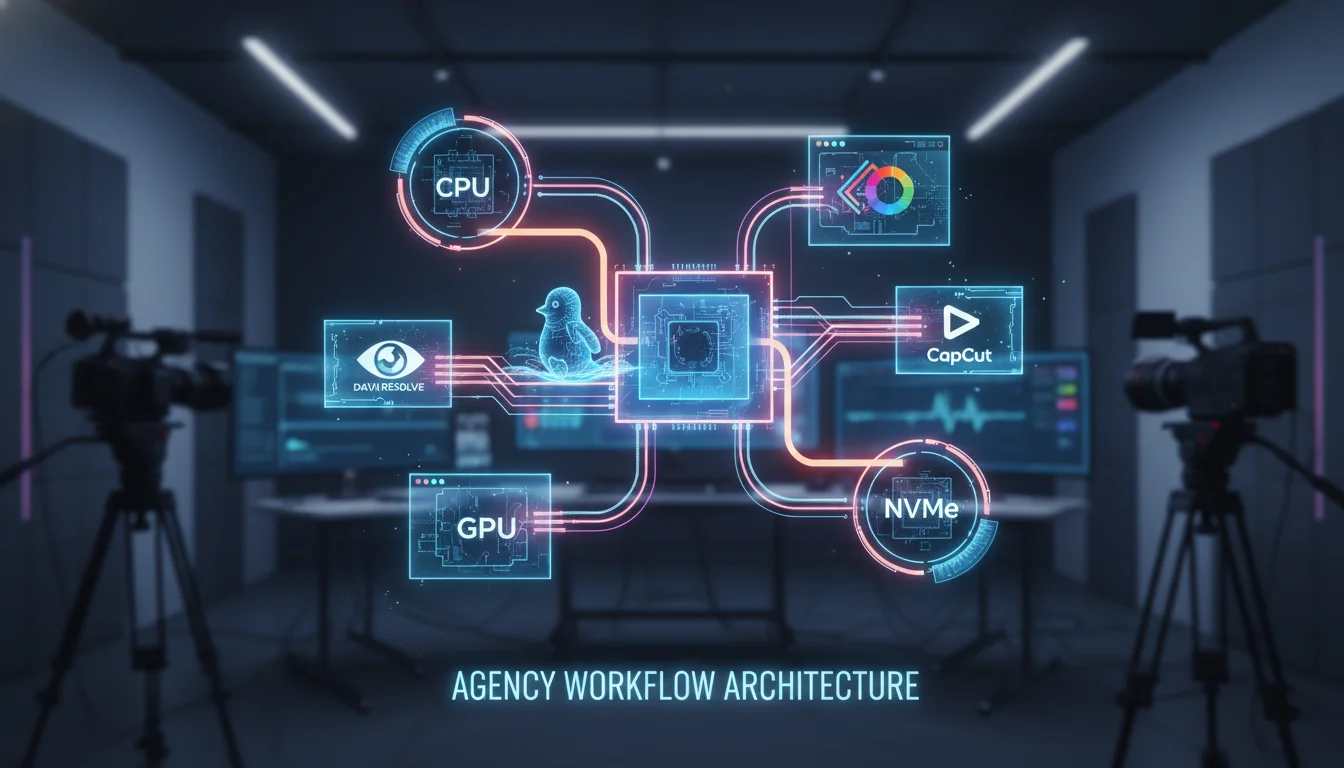
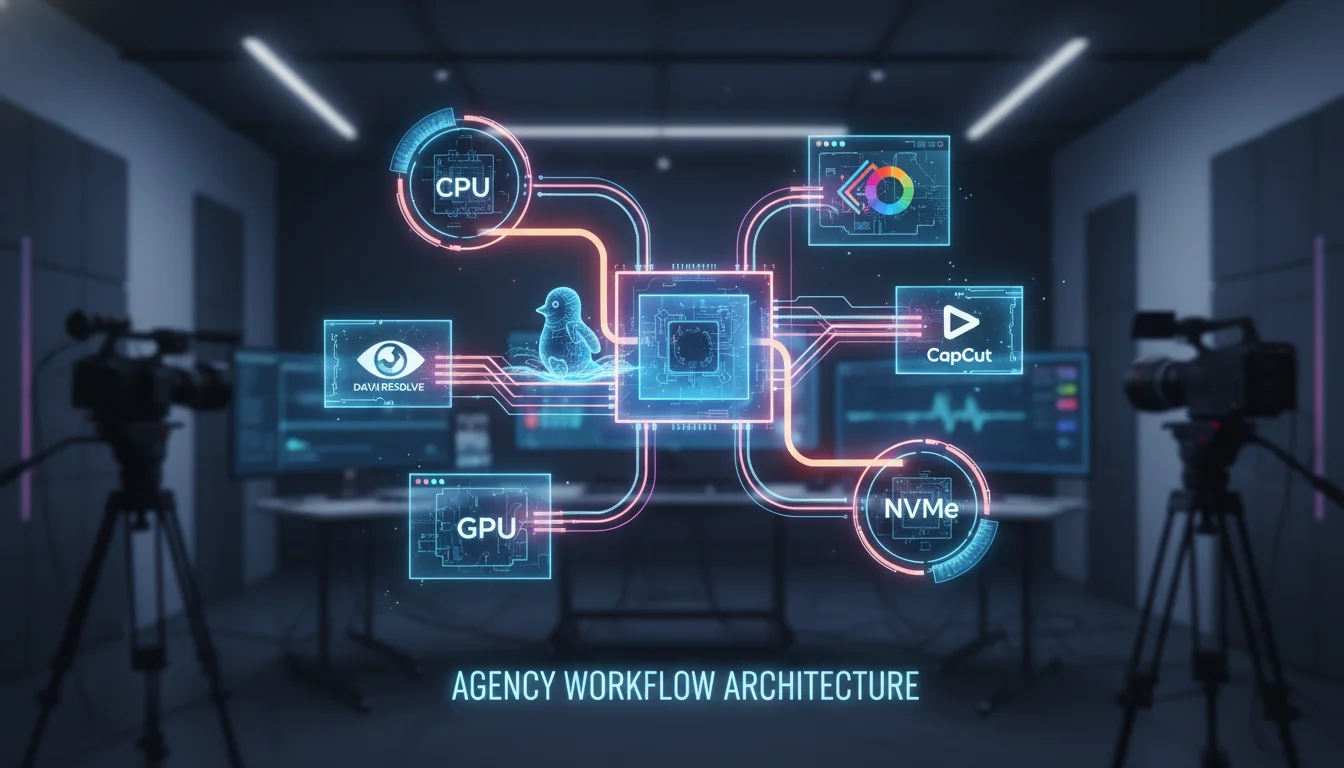
Architecting the Workstation Hardware Foundation
The foundation of any rapid content creation pipeline is the local workstation hardware. The ingestion, processing, and rendering of 4K, 6K, and 8K footage, particularly in uncompressed or complex intra-frame codecs, demands highly specialized hardware configurations. Failure to properly provision a workstation inevitably leads to timeline playback latency, severe rendering bottlenecks, and critical system instability during tight client deadlines.
Central Processing Unit (CPU) Dynamics and Decoding Operations
While modern non-linear editing (NLE) applications heavily leverage the GPU for visual effects, color processing, and artificial intelligence tasks, the Central Processing Unit (CPU) remains the primary engine for media decoding, timeline management, and system-level input/output operations. The architectural choice of the CPU fundamentally dictates the underlying motherboard platform, PCIe lane availability, and overall memory bandwidth.
For high-end, uncompromised workstations handling massive multi-camera arrays and complex 3D compositing, the AMD Threadripper™ 9000 series represents the current pinnacle of multi-threaded performance. Processors such as the 24-core AMD Ryzen Threadripper 9960X or the 32-core 9970X provide the massive PCIe lane counts necessary to support multiple discrete GPUs and high-speed NVMe storage arrays simultaneously without creating data chokepoints. However, extreme core counts do not scale linearly across all creative workloads. Applications like DaVinci Resolve’s Fusion page, which relies heavily on node-based compositing, often benefit more from high single-core clock frequencies rather than exceptionally wide multi-threading.
For standard 4K editing pipelines and rapid social media content creation, mainstream processor architectures offer superior price-to-performance ratios and specific hardware advantages. The Intel Core™ Ultra 200 series (such as the Ultra 9 285K or Ultra 7 265K) and the AMD Ryzen™ 9000 series (such as the 9950X3D) are highly recommended for these environments. The Intel Core architectures hold a distinct, highly valuable advantage for rapid content workflows due to the inclusion of Intel Quick Sync Video technology. Quick Sync provides dedicated, hardware-level decoding for heavily compressed inter-frame codecs like H.264 and H.265 (HEVC). Because these highly compressed formats are ubiquitous in social media delivery, consumer drone footage, and rapid content creation, hardware-level decoding significantly reduces playback latency and timeline stuttering without monopolizing the discrete GPU’s compute resources.
Graphics Processing Unit (GPU) Selection and VRAM Limitations
The GPU is arguably the most critical component in a modern video editing workstation, dictating the speed of color grading, temporal noise reduction, and the execution of AI-accelerated features like automatic masking and voice isolation. In the context of Linux environments, the disparity between GPU vendors is profound, dictating not only hardware choice but the viability of the entire software stack.
For maximum performance, the NVIDIA GeForce RTX™ 50 series (including the RTX 5080 16GB and RTX 5090 32GB) currently dominates the high-end consumer and prosumer market. While professional-grade cards like the NVIDIA RTX PRO™ Blackwell series (formerly the Quadro line) offer certified reliability and massive memory pools (up to 48GB), standard GeForce RTX cards are heavily favored by video agencies due to their overwhelmingly superior price-to-performance ratio in rendering workloads.
Video RAM (VRAM) capacity is the primary constraint and the most frequent cause of system crashes in modern post-production workflows. The spatial resolution of the editing timeline directly dictates VRAM requirements. An 8GB VRAM buffer is considered the absolute minimum threshold for basic 1080p workloads, while 12GB to 16GB is strictly required for fluid 4K editing. For complex 6K or 8K timelines featuring optical flow retiming, intensive color grades, or temporal noise reduction, 20GB to 32GB of VRAM is essential. If the VRAM buffer is exceeded during operation, the NLE will either crash immediately or fall back to system RAM (out-of-core memory), which paralyzes performance and renders the system unusable for real-time playback. Furthermore, a critical architectural reality in multi-GPU configurations is that VRAM does not pool. Each GPU must mirror the exact same dataset; therefore, a workstation equipped with two 16GB GPUs is still strictly limited to a 16GB maximum VRAM payload.

Memory (RAM) and Storage Hierarchies
System memory and local storage must be meticulously tiered to prevent data read/write bottlenecks from starving the CPU and GPU of information. A minimum of 64GB of high-speed DDR5 RAM (preferably DDR5-5600 or DDR5-6000) is required for seamless 4K editing and multitasking, while 96GB to 192GB is heavily recommended for 8K workflows or pipelines that require keeping both DaVinci Resolve and Adobe After Effects open concurrently.
Local storage architecture must be segregated into distinct functional tiers utilizing the PCIe Gen4 or Gen5 NVMe protocol to ensure maximum throughput:
| Storage Tier | Recommended Hardware | Architectural Purpose |
|---|---|---|
| Tier 1: OS & Applications | 1TB PCIe Gen4/Gen5 NVMe SSD | Ensures rapid boot times for the Ubuntu 24.04 kernel and immediate application initialization. |
| Tier 2: Active Media & Projects | 2TB - 4TB PCIe Gen4/Gen5 NVMe SSD | Dedicated solely to hosting high-bandwidth raw media files, preventing read contention with the operating system. |
| Tier 3: Cache & Scratch | 1TB - 2TB PCIe Gen4/Gen5 NVMe SSD | Isolates high-stress, continuous read/write operations (media cache, proxy generation, and optimized media) from primary assets. |
| Tier 4: Nearline Archive | High-Capacity SATA SSD or HDD | Serves as local cold storage for completed projects before they are migrated to the central server or cloud archive. |
Traditional platter hard disk drives (HDDs) are entirely obsolete for active video editing and should be relegated strictly to long-term, cold archival storage. NVMe drives are an absolute necessity for sustaining the throughput required by high-bitrate footage, which frequently exceeds 2,000 megabits per second.
Collaborative Storage Infrastructure: NAS vs. SAN Architectures
When a production agency scales beyond a single workstation, implementing a centralized, collaborative storage environment becomes the most critical infrastructural decision. The architectural choice between a Network-Attached Storage (NAS) system and a Storage Area Network (SAN) fundamentally alters the facility’s network topology, IT maintenance overhead, and total data throughput capabilities.
Network-Attached Storage (NAS) Topologies
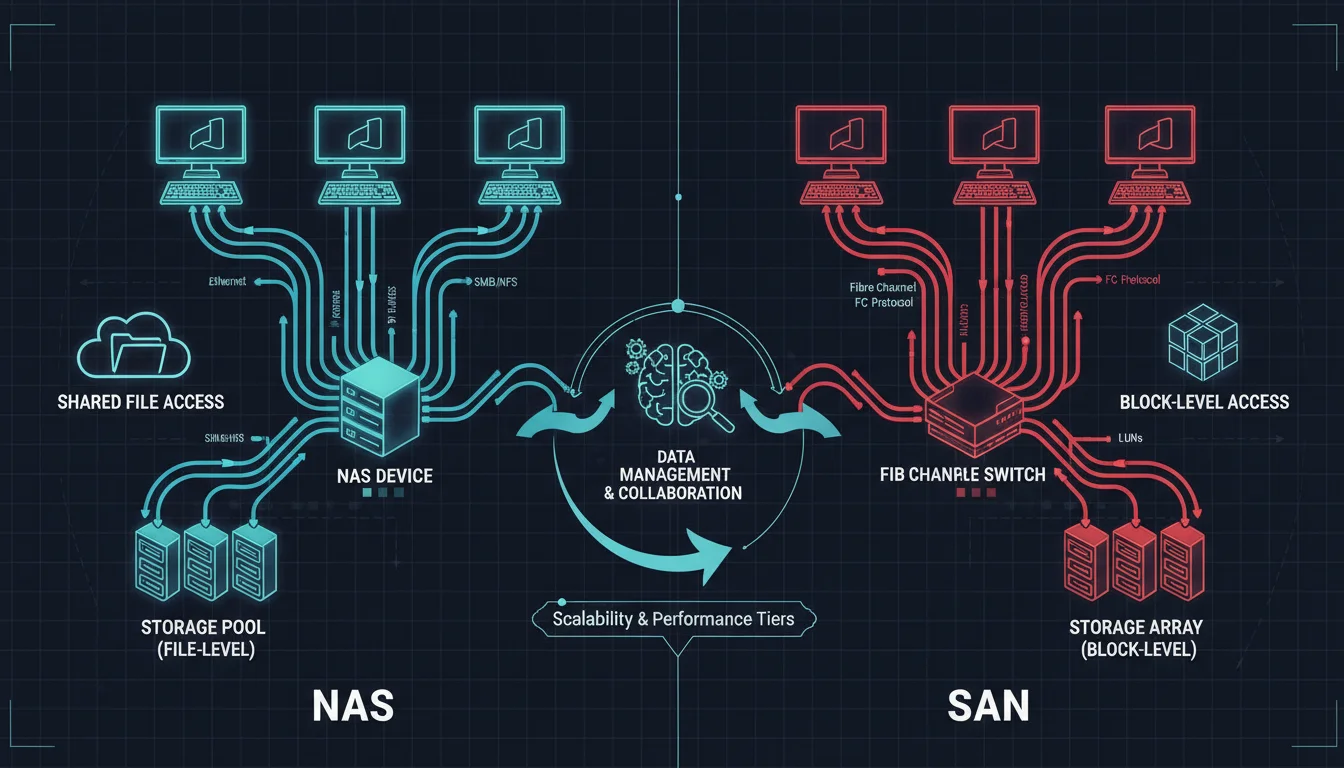
A NAS is a file-level data storage device connected directly to a standard Ethernet Local Area Network (LAN). Modern NAS configurations utilized by video agencies routinely deploy 10GbE, 25GbE, or even 40GbE network interfaces to provide sufficient aggregate bandwidth to support multiple editors accessing 4K media simultaneously. Because NAS operates at the file level, it relies on higher-layer network protocols such as Server Message Block (SMB/CIFS) or Network File System (NFS) to manage data access, permissions, and file locking.
For Ubuntu and broader Linux-based editing environments, the NFS protocol is vastly superior to SMB.
NFS is inherently designed for Unix-like systems and operates with significantly less computational protocol overhead. This architectural efficiency allows for blazing-fast transfers of large volumes of small files—such as image sequences, XML metadata, and lightweight proxies—while maintaining lower overall network latency. While establishing secure NFS permissions across a mixed-OS environment requires precise user ID (UID) and group ID (GID) mapping, the performance gains on Linux workstations are substantial.
High-end NAS solutions engineered specifically for media production, such as the Studio Network Solutions (SNS) EVO or GB Labs FastNAS, offer powerful hybrid capabilities. These systems blend traditional NAS accessibility with proprietary, built-in Media Asset Management (MAM) software, automated proxy generation tools, and project-locking mechanisms that natively integrate with NLEs like DaVinci Resolve and Adobe Premiere Pro.
Storage Area Network (SAN) Topologies
In contrast to the file-level access of a NAS, a SAN provides block-level storage access, establishing a dedicated, high-speed network that is entirely physically and logically isolated from the facility’s standard IP traffic. This isolation ensures that standard office activities (such as internet browsing or large file downloads) cannot interrupt or degrade the performance of the storage network. SANs typically utilize the Fibre Channel protocol (e.g., 8GFC, 16GFC, or 32GFC), which is specifically engineered for lossless, in-order packet delivery. To the client workstation, a SAN-connected logical unit number (LUN) appears exactly as a directly attached local disk rather than a mapped network share.
The primary advantage of a SAN architecture is its ultra-low latency and massive, predictable throughput, which is absolutely critical for uncompressed color grading, massive visual effects (VFX) pipelines, and synchronized multi-camera editing involving dozens of high-resolution streams. However, SANs require a highly complex and expensive infrastructure. Deployments necessitate specialized Host Bus Adapters (HBAs) installed in every workstation, dedicated Fibre Channel switches, and highly sophisticated metadata controllers (such as Quantum StorNext) to manage concurrent user read/write privileges at the block level and prevent data corruption.
Architectural Verdict for 2026 Agencies
For the vast majority of modern, rapid-content video agencies in 2026, a 10GbE or 25GbE NAS array utilizing NVMe flash caching tiers provides the optimal balance of throughput, scalability, and simplified IT administration. The advent of ultra-fast Ethernet has largely closed the performance gap for compressed 4K and 6K workflows. SAN architectures are now generally reserved for elite feature film finishing facilities or massive broadcast hubs requiring absolute zero-latency guarantees for uncompressed 8K media.
| Architectural Feature | Network-Attached Storage (NAS) | Storage Area Network (SAN) |
|---|---|---|
| Data Access Layer | File-level processing (NFS, SMB, AFP) | Block-level processing (SCSI commands) |
| Network Fabric | Standard TCP/IP Ethernet (10GbE to 40GbE) | Dedicated Fibre Channel or iSCSI Fabric |
| Latency & Overhead | Variable, higher TCP/IP packet overhead | Ultra-low, lossless, deterministic data transmission |
| Linux Integration | Excellent native performance via NFSv4 | Complex, requires specialized HBA driver management |
| Cost & Maintenance | Cost-effective, manageable by standard IT | High capital expenditure, requires specialized SAN administration |
| Ideal Agency Use Case | Collaborative 4K editing, rapid social content, hybrid remote work | High-end VFX, uncompressed color grading, zero-latency multi-cam |
The End-to-End Software Workflow Pipeline
Provisioning high-performance hardware represents only half of the infrastructural equation. To maximize efficiency and protect profit margins, agencies must implement a rigidly structured, highly automated media supply chain encompassing ingest, proxy generation, editing, review, and final delivery. Relying on manual file management or disconnected tools inevitably leads to fragmented assets, vague feedback loops, and severe project delays that destroy creative momentum.
Phase 1: Accelerated Ingest and Cloud Transfer
The ingest phase marks the moment raw media is transferred from vulnerable camera cards to secure, centralized storage. In modern distributed pipelines, the traditional practice of shipping physical hard drives via courier is considered obsolete, slow, and highly insecure. Instead, progressive agencies utilize accelerated cloud transfer platforms, such as MASV, which bypass standard TCP transmission limitations to fully saturate available internet bandwidth. This facilitates the secure, rapid transfer of terabytes of 8K raw footage from remote locations across the globe directly to the agency’s internal servers.
Simultaneously, workflow automation software like Telestream ContentAgent, or robust Media Asset Management (MAM) systems like IPV Curator and Iconik, intercept these incoming files. These systems automatically perform checksum verifications (e.g., MD5 or xxHash) to ensure cryptographic data integrity, guaranteeing that not a single byte of footage is corrupted during transit. Following verification, the MAM utilizes multimodal AI to automatically transcribe spoken dialogue, recognize specific faces or logos, and tag the raw media with searchable metadata, entirely eliminating the need for manual logging.
Phase 2: The Proxy Workflow Imperative
The sheer data rate of uncompressed or high-resolution intra-frame codecs (such as 6K Blackmagic RAW or REDCODE RAW) will rapidly overwhelm even the most robust 25GbE network fabrics when accessed concurrently by multiple remote and local editors. Therefore, the automated generation of lightweight, low-resolution proxy files is a mandatory step in the production pipeline.
In a properly configured agency pipeline, the MAM, a dedicated render node, or the NLE itself automatically transcodes incoming high-resolution media into manageable formats—typically Apple ProRes Proxy or highly compressed H.264—in the background. Editors connect their timelines strictly to these proxy files, which demand a fraction of the processing power and network bandwidth. This proxy architecture allows for smooth, real-time playback and scrubbing, even over standard home Wi-Fi or VPN connections for remote staff. Once the creative edit reaches “picture lock,” the software executes a conform process, automatically swapping the proxies and relinking the timeline directly to the original, high-resolution master files for color grading, VFX compositing, and final export.
Phase 3: Frame-Accurate Review and Approval
Traditional review processes—which rely on exporting low-quality drafts, emailing them to clients, and receiving feedback via disjointed spreadsheets or text messages—cause profound operational drag and frequently result in critical miscommunications. Modern pipelines eradicate this friction by integrating asynchronous review and approval platforms, such as Frame.io, Iconik, or Screendragon, directly into the NLE interface.
These platforms provide a centralized, cloud-based viewing environment where stakeholders can watch the edit, draw directly on specific frames, and leave time-stamped comments. This feedback is instantly synchronized back to the editor’s timeline as actionable, localized markers. Furthermore, these tools manage strict version control and automated approval routing, ensuring that legal and brand compliance teams sign off on deliverables before final distribution.
Deploying DaVinci Resolve on Ubuntu 24.04: Architecture and Performance
Blackmagic Design’s DaVinci Resolve is the undisputed industry standard for color grading and professional finishing. However, deploying the software on Linux presents unique architectural challenges. Blackmagic explicitly restricts its official Linux support to enterprise-grade distributions, specifically Rocky Linux 8.6 and CentOS 7.3. Deploying Resolve on a modern, cutting-edge, and highly popular desktop distribution like Ubuntu 24.04 LTS requires sophisticated dependency management, containerization strategies, and a deep understanding of proprietary codec limitations.
Dependency Mitigation and Installation Complexities
The standard Linux installer for DaVinci Resolve is a monolithic .run archive containing a massive payload of bundled proprietary libraries. When executing this installer natively on Ubuntu 24.04, the system immediately encounters critical dependency validation failures. The installer searches for obsolete, legacy packages like libasound2, which the modern Ubuntu 24.04 architecture has officially deprecated and replaced with libasound2t64.
To force the installation to proceed, the system administrator must bypass the hardcoded package checks by executing the installer with a specific environment variable: sudo SKIP_PACKAGE_CHECK=1./DaVinci_Resolve_Studio_19.0_Linux.run -i.
Following a successful installation, the application will frequently fail to launch, resulting in silent crashes or fatal symbol lookup errors within the terminal output. This instability occurs because DaVinci Resolve bundles its own outdated glib libraries (specifically libglib-2.0.so, libgio-2.0.so, and libgmodule-2.0.so) which fundamentally conflict with Ubuntu 24.04’s modern system libraries. To achieve stability, the user must manually navigate to the /opt/resolve/libs/ directory, create a quarantine folder (e.g., unneeded), and move these bundled libraries out of the execution path, thereby forcing Resolve to hook into the native, up-to-date Ubuntu equivalents.
To avoid these manual, highly fragile interventions, advanced deployment architectures utilize containerization.
Projects like davincibox or automated Ansible scripts by the open-source community leverage Distrobox to generate an isolated Rocky Linux environment within Ubuntu. This approach satisfies all of Blackmagic’s enterprise dependencies while allowing the application to interface seamlessly with the host’s display server and audio subsystems, circumventing host-level library conflicts entirely.
GPU Hardware Acceleration: The NVIDIA vs. AMD Compute Paradigm
In a Linux post-production environment, the choice of GPU vendor is not merely a matter of brand preference; it dictates the fundamental viability of the entire editing pipeline. The performance, stability, and reliability disparity between NVIDIA and AMD is stark.
NVIDIA Architecture
DaVinci Resolve’s underlying image processing engine is deeply and historically optimized for NVIDIA’s Compute Unified Device Architecture (CUDA) platform. By installing the proprietary NVIDIA drivers (such as version 535 or 550) via the ubuntu-drivers utility, editors achieve immediate, robust hardware acceleration. The integration on Linux is virtually seamless, providing exceptional rendering speeds, flawless execution of complex OpenFX plugins, and comprehensive support for DaVinci’s Neural Engine AI features, such as Magic Mask, Smart Reframe, and Voice Isolation. Furthermore, NVIDIA’s NVENC hardware encoders deliver vastly superior performance when exporting final deliverables.
AMD Architecture
Conversely, attempting to utilize a high-end AMD Radeon GPU (such as the RX 6950 XT or RX 7900 XTX) on Linux for DaVinci Resolve is an exercise historically fraught with profound instability and setup friction. While AMD’s open-source amdgpu drivers are brilliantly integrated directly into the Linux kernel and provide exceptional, plug-and-play gaming performance under Wayland, DaVinci Resolve strictly requires proprietary OpenCL compute libraries to function.
To achieve hardware acceleration, users must manually install the Radeon Open Compute (ROCm) stack, specifically isolating the rocm-opencl-runtime, and explicitly add their user profiles to the render and video system groups. However, even with a theoretically flawless installation, AMD GPUs frequently suffer from severe timeline latency, dropped frames during high-resolution rendering, and entirely broken or unsupported AI functionalities within Resolve. While the latest RDNA3 and CDNA architectures show incremental improvements in compute benchmarks, NVIDIA remains the unequivocal, mandate-level recommendation for Linux-based post-production.
The Linux Codec Bottleneck: Licensing Constraints for H.264, H.265, and AAC
The most significant and frustrating hurdle for agencies migrating to an Ubuntu ecosystem is DaVinci Resolve’s heavily restricted codec support. These limitations stem entirely from proprietary licensing costs imposed by entities like MPEG LA, rather than any technical hardware limitations of the Linux kernel.
Video Codec Restrictions
The Free version of DaVinci Resolve on Linux explicitly blocks the decoding and encoding of H.264 and H.265 (HEVC) media. Because these are the two most common formats generated by consumer mirrorless cameras, drones, smartphones, and screen recording software, importing standard MP4 files into the Free version results in a catastrophic “Media Offline” error or a blank black screen. Upgrading to DaVinci Resolve Studio (a $299 lifetime license) completely resolves this issue, unlocking full, hardware-accelerated H.264 and H.265 decoding and encoding via the system’s GPU.
Audio Codec Restrictions
Crucially, neither the Free nor the paid Studio version of DaVinci Resolve supports the Advanced Audio Coding (AAC) codec on Linux. Because AAC is the universal standard audio format multiplexed into nearly all commercial H.264 and H.265 MP4 files, importing standard footage into Resolve Studio on Ubuntu will yield perfectly synchronized, accelerated video, but absolute audio silence.
To circumvent this licensing blockade, Linux editors must utilize FFmpeg—a powerful open-source command-line tool—to transcode the audio streams of their source media prior to ingest. The standard, highly efficient automated workaround involves a bash script that iterates through a directory of MP4 files, copies the video stream without re-encoding (to preserve original generation quality and save immense amounts of time), and transcodes the unsupported AAC audio into an uncompressed 16-bit PCM WAV format (pcm_s16le), wrapping the final output in a highly compatible QuickTime MOV container.
A standard architectural implementation of this pipeline script is as follows:
Bash
#!/bin/bash
for f in *.mp4; do
 ffmpeg -i "$f" -c:v copy -acodec pcm_s16le "${f%.mp4}.mov"
done
While effective, this necessity adds a mandatory processing step to the ingest workflow, marginally slowing down rapid turnaround times for agencies dealing with massive volumes of consumer-sourced or stock media.
Executing CapCut Workflows in Linux: Containerization vs. Translation
While DaVinci Resolve excels in high-end, cinematic finishing, the contemporary demand for vertical, short-form video (such as TikTok, Instagram Reels, and YouTube Shorts) has catapulted CapCut into absolute ubiquity. CapCut offers highly accurate AI-driven auto-captioning, extensive trend-based templates, and immediate social media integrations that drastically outpace traditional NLEs in raw output velocity.
However, ByteDance, the developer of CapCut, does not provide a native Linux client. Ubuntu users must therefore rely on advanced containerization techniques or Windows compatibility translation layers to execute the application, presenting varying degrees of performance, stability, and hardware acceleration.
The Waydroid Container Architecture
Waydroid represents the most performant, elegant method for running CapCut on modern Ubuntu systems. Unlike traditional virtual machines (such as QEMU/KVM) which emulate complete, heavy hardware environments with significant computational overhead, Waydroid utilizes LXC (Linux Containers) and namespace technologies to run a full, native Android operating system directly on the host’s Linux kernel.
Because Waydroid operates at the kernel level, it offers near-native CPU performance. However, Waydroid’s architecture strictly requires the modern Wayland display server protocol and will fundamentally fail to execute under legacy X11 environments. Deploying CapCut via Waydroid involves a precise sequence of operations:
- The Waydroid repository is added via curl, and the container is initialized with a standard Android image utilizing sudo waydroid init.
- The user provisions the container with the CapCut APK, downloaded from a trusted repository.
- For video editing, which requires substantial memory buffers, modifying the container using waydroid config is mandatory to allocate maximum available system RAM, preventing application crashes during timeline scrubbing.
- GPU acceleration must be passed through from the host to ensure the container is not relying on sluggish, CPU-bound software rendering.
It is critical to note that while AMD and Intel GPUs pass through efficiently to Waydroid via the open-source Mesa drivers, NVIDIA’s proprietary drivers face severe, documented complications with Waydroid’s Wayland implementation. This often breaks explicit sync, causing visual tearing, or completely fails to provide hardware acceleration for 3D tasks within the container.
When properly optimized on compatible hardware, the Waydroid implementation of CapCut provides complete access to its mobile AI feature set, including instantaneous background removal, text-to-speech generation, and highly accurate auto-captioning, operating smoothly in a resizable, native-feeling desktop window.
The Wine Staging Compatibility Layer
For users requiring the specific interface of CapCut Desktop, or for those utilizing NVIDIA GPUs that struggle with Waydroid integration, Wine (Wine Is Not an Emulator) provides a sophisticated translation layer. Wine intercepts Windows API calls made by the CapCut executable and translates them on-the-fly into POSIX-compliant Linux calls.
Running CapCut Desktop via Wine (specifically leveraging development branches like Wine Staging 10.13) requires intricate manual configuration. Core Windows libraries, such as vcrun2019 and Microsoft core fonts, must be injected into the designated Wine prefix utilizing the winetricks utility to satisfy the application’s runtime dependencies.
The most notorious and widely documented issue with executing CapCut under Wine is the “Transparency Bug.” In this scenario, child windows and vital video player overlays fail to render transparency data, instead appearing as opaque black boxes that completely obstruct the timeline preview and render the application unusable. This graphical anomaly is caused by profound failures in how Wine interfaces with Linux window compositor decorations.
The verified architectural workaround requires the user to open the winecfg tool, navigate to the Graphics tab, and explicitly untick both “allow the window manager to decorate windows” and “allow the window manager to control the windows”. Furthermore, establishing the Wine environment configuration to simulate a Windows 11 architecture ensures maximum compatibility and stability with the latest CapCut executables.
CapCut Web: The Browser-Based Alternative
For users unwilling or unable to manage the complexities of container dependencies or Wine prefixes, CapCut Web offers a zero-installation, browser-based alternative. The web platform provides fundamental trimming capabilities, excellent automatic speech recognition for caption generation, and robust multi-language support.
However, from an agency perspective, CapCut Web is fundamentally limited by browser-level memory allocation constraints. It is wholly unsuitable for processing high-bitrate 4K footage or executing complex, multi-layered compositing tasks, and it introduces a severe point of failure by requiring persistent, high-bandwidth internet connectivity to function.
Strategic Deployment: DaVinci Resolve vs. CapCut in the Agency Pipeline
In a highly optimized agency setting, DaVinci Resolve and CapCut should not be viewed as mutually exclusive competitors; rather, they are complementary tools serving entirely different vectors of the modern content supply chain.
DaVinci Resolve is the definitive, uncompromised choice for “hero” content—national commercials, high-end documentaries, and premium brand anthems. Its advanced 32-bit float image processing pipeline, complex node-based Fusion compositor, and sub-frame accurate Fairlight audio engine provide microscopic, absolute precision over color science, complex 3D keyframing, and multi-camera synchronization. However, this immense power demands a steep learning curve and necessitates exorbitant hardware investments, specifically demanding massive GPU VRAM buffers. Furthermore, executing seemingly simple tasks—such as generating highly stylized, animated subtitles tailored for vertical video algorithms—requires tedious manual keyframing or the complex creation of macros within the Fusion page.
Conversely, CapCut acts as a massive momentum multiplier. It democratizes complex post-production workflows by packaging them into frictionless, single-click AI actions. Features that would take a highly skilled editor an hour to construct in DaVinci Resolve—such as dynamic object tracking, auto-captions with bouncing highlight colors, and trend-specific visual transitions—are executed instantaneously in CapCut. For modern agencies, time is the ultimate currency. CapCut allows junior editors or social media managers to rapidly ingest media, apply standardized brand templates, auto-generate highly accurate multilingual subtitles, and export directly to TikTok or Instagram Reels in a fraction of the time required by a traditional, heavy NLE.
Constructing the Hybrid Pipeline
The most operationally efficient workflow architecture for a 2026 media agency fuses the inherent strengths of both platforms.
The pipeline initiates in DaVinci Resolve, where massive, high-resolution raw media files are ingested, proxy-edited for speed, color-graded to exacting cinematic standards, and audio-mixed to ensure strict broadcast loudness compliance. Following the picture lock, a pristine, high-bitrate master file (such as an Apple ProRes 422 HQ or DNxHR file) is rendered and exported.
This flawless master file is subsequently ingested into CapCut (running via Waydroid or Wine on the Ubuntu workstation). Within CapCut, the sequence is rapidly reformatted from traditional 16:9 widescreen to 9:16 vertical aspect ratios using AI-driven auto-reframe tools that intelligently track the subject. CapCut’s localized speech-to-text engine then applies high-engagement, animated captions, and the asset is rapidly exported for multi-platform social media distribution. This hybrid architectural approach guarantees the highest possible visual fidelity while simultaneously maximizing the velocity of digital content distribution.
Synthesized Conclusions
The architecture of a modern video production pipeline operating within an Ubuntu 24.04 environment represents a delicate, highly technical balance between brute-force hardware performance, advanced network topologies, and intricate software administration.
To achieve uncompromised speed and reliability, agencies must provision workstations with top-tier multi-core processors (such as the AMD Threadripper 9000 series or Intel Core Ultra 200 series) and, crucially, NVIDIA RTX 50-series GPUs. The deployment of AMD graphics hardware in a Linux post-production environment introduces severe operational liabilities due to ROCm compute configuration complexities and a history of poor DaVinci Resolve optimization.
At the macro, facility-wide scale, these high-performance local workstations must be tethered to a robust 10GbE to 25GbE NAS infrastructure. Utilizing the highly efficient NFS protocol provides the necessary bandwidth and low latency required for concurrent, multi-editor 4K workflows, entirely avoiding the prohibitive capital expenditure and IT maintenance overhead associated with Fibre Channel SAN deployments.
Software workflows necessitate strict adherence to automated standard operating procedures. Massive raw files must be ingested via accelerated cloud protocols, verified via checksums, and immediately transcoded to lightweight proxies to preserve local network integrity. For Ubuntu users, successfully deploying DaVinci Resolve Studio requires navigating complex library conflicts and implementing automated FFmpeg bash scripts to seamlessly bypass hardcoded AAC audio licensing limitations. Meanwhile, executing high-speed social media workflows via CapCut requires deep containerization knowledge, leveraging Waydroid for optimal CPU pass-through or meticulously configuring Wine prefixes to circumvent graphical rendering bugs.
Ultimately, agencies that master these technical complexities unlock profound competitive advantages. By intelligently integrating the surgical, cinematic precision of DaVinci Resolve with the rapid, AI-driven automation of CapCut within a highly stable, centrally managed, and containerized Linux ecosystem, production teams can dramatically reduce turnaround times, scale their creative output exponentially, and deliver uncompromising quality across all broadcast and digital platforms.